Automation CLI
automation/cli bundles high-level workflows powered by OrbitronServices. All commands honour the global flags for logging, periodic boundary conditions, and data root. The one exception is view --tui, which refuses --cell-cubic, --select and --blank rather than applying them. --pbc only qualifies --cell-cubic, so view ignores it on its own and refuses it only alongside --cell-cubic. - For scripting, -q/--quiet suppresses the banner and the progress spinner on every command (it bundles --no-banner and --no-progress); --no-progress alone keeps the banner and drops only the background-loading progress output. - --xyz-unit <angstrom|bohr> says which unit a plain XYZ file’s coordinates are in. The format does not record it, so a file written in bohr otherwise loads 1.89 times too small, with bond perception finding nothing. - The persisted file-size cap from config.toml is applied automatically. Override it per invocation with --max-file-size BYTES, or update the default via orbitron config set-thresholds --max-file-size-mb <value>. - Before each load the CLI projects the operation’s peak memory against available RAM. Warnings go to stderr, so JSON and piped data on stdout stay clean. Interactive launches prompt only when both stdin and stderr are terminals, with No as the default. In scripts, warning-band projections continue, critical projections fail, and impossible machine limits always fail. --allow-large permits a critical advisory projection after you have checked the risk. It cannot override --max-memory BYTES or an impossible machine limit. The default hard cap is 0, meaning unlimited.
4.0 Quickstart Workflow
Inspect a molecule
orbitron info io/pipelines/tests/fixtures/xyz/water.xyz --jsonThis prints atoms, bonds, bounding box, and metadata.
Measure a distance (atom indices are 1-based)
orbitron measure io/pipelines/tests/fixtures/xyz/water.xyz --distance 1 2Render a PNG headlessly
mkdir -p ~/scratch/orbitron-quickstart
orbitron render io/pipelines/tests/fixtures/xyz/water.xyz \
  -o ~/scratch/orbitron-quickstart/water.png
| Command | Purpose | Highlights |
|---|---|---|
info <file> |
Load a scene and print summary | Optional --json, cell overrides, --frame N for one trajectory frame (0-based; --record is an alias, for entry N of a multi-record SDF), prints bounding box/elements/metadata, surfaces extras.molpro when Molpro data is present (with --molpro-task N / --molpro-kind freq filters), extras.molcas for Molcas/OpenMolcas runs, and a cross-program program_tasks block (DIRAC, QE, NWChem, etc.) sourced from canonical extras |
resources <file> (alias resource) |
Estimate source-open memory without parsing | Reads metadata plus at most 64 KiB of the source, reports bounded count hints, current host memory, the projected policy band, and any configured hard cap; optional --json and --mode scene\|trajectory\|indexed-trajectory (default indexed-trajectory) |
analyze geometry\|orbitals\|populations\|bond-orders\|vibrations |
Static and calculation analyses | JSON or human output, --frontier, --top, --projected knobs; computed bond orders retain method, matrix coverage, print thresholds, and three-center terms. Human bond-order reports print at most 100 pair and 100 three-center rows per analysis unless --limit N or --all is supplied. analyze orbitals --movecs <file> takes every orbital from an NWChem .movecs when the output printed only a window of them, and refuses one from another job or SCF. analyze --task N[:KIND] reads one task of a multi-task output, numbered from 1 as the desktop’s task panel lists them; KIND names one calculation of a Gaussian stage: opt, freq, sp, force, pop, stable, scan, irc, or stage for a stage whose calculation is none of those. |
analyze symmetry |
Point group of the structure | Schoenflies symbol, its operations, and the groups reached at looser tolerances, from the same detector the desktop’s Scene Info uses. --tolerance in Å (default 0.1), --max-atoms (default 500; detection grows about as the cube of the atom count), --json emits orbitron.analyze.symmetry/1. |
analyze validation |
Structural validation of a model | Backbone and side-chain conformation against the Top8000 reference distributions, steric clashes, missing side-chain and backbone atoms, and chain termini. --include-hydrogens puts hydrogens into the clash test; --json emits orbitron.analyze.validation/1. Section §4.1.6 |
analyze metal-sites |
Triage metal coordination spheres | Coordination number, the reference polyhedron each sphere resembles, every donor distance against its tabulated value, and the bond-valence sum with the oxidation state it implies. Without --oxidation-state a centre takes the state its file states or its formal charge, else the ionic model’s or a consistent bond-valence sum’s, else its element’s one usual state, and each site says which; the flag overrides that inferred state. Also reports the electron count (with its alternatives when the geometry leaves it unsettled), a trust grade for the state, the percent buried volume of the whole sphere and of each ligand (%V_bur, SambVca’s conventions) and each ligand’s exact cone angle, and the sigma-only ligand-field picture that plot ligand-field draws. Section §4.9, and Metal-site accuracy |
analyze sterics |
Buried volume by ligand, quadrant and octant | One metal’s %V_bur by ligand with exact cone angles and, in a frame set by --z-atoms and --xz-atoms, by quadrant and octant, in MORFEUS’s frame and numbering. --metal-ligand-distance moves each one-donor ligand to a fixed distance first, as SambVca’s tables are made. plot steric-map draws the map. See Metal sites. |
analyze nbo-e2 |
NBO second-order perturbation table | The donor-acceptor E(2) energies a run printed, strongest first. --min drops interactions weaker than that many kcal/mol (default 0), --limit sets the rows printed per spin channel (default 25; JSON carries every row), --json emits orbitron.analyze.nbo-e2/1. |
analyze magnetism |
Magnetic anisotropy of a spin-orbit run | Reads OpenMolcas SINGLE_ANISO: each pseudospin multiplet’s energy, g tensor, main axis and its angle to the ground one, and the M_J its states hold most of; the ground multiplet’s crystal-field parameters; powder χT and magnetization. --json carries everything read. See Analysis Results. |
analyze dos |
Broaden projected states into a density of states | Turns a discrete list of projected eigenvalues (CP2K’s .pdos) into a curve. --broadening is the FWHM in eV (default 0.1), --shape gaussian\|lorentzian, --step the grid spacing (default 0.01 eV). The width is a choice, not a property of the run, so it is always reported alongside the result. |
analyze metadynamics |
The free-energy surface a metadynamics run built | Reads a CP2K run’s collective variables, its series, and its hills, and sums the hills into a free-energy profile (one variable) or map (two). Reports how closely that reconstruction reproduces the bias the run itself recorded step by step. --points, --margin, --figure <png>. |
analyze spectrum |
Absorption spectrum from a real-time propagation | Fourier transforms the dipole a delta kick set ringing. --damping (fs) sets the linewidth, --max-energy, --points, --figure <png>. Reports the energy resolution the trajectory’s length allows and the oscillator-strength sum rule against the run’s own electron count, which is what says whether the numbers can be believed. |
analyze qmc |
The error bar on a QMC run, from its own per-block traces | Reads one or more QMCPACK decks and the <project>.sNNN.stat.h5 files beside it, and reports every scalar with a blocked standard error rather than the naive one, which a correlated walk makes too small. One series is one task, so a VMC-then-DMC deck reports two. A run too short for the blocking curve to flatten gets no error bar and says so. Also reports ionic forces (from the .scalar.dat beside the results, with the sum rule that checks them) and natural occupations from a one-body density matrix, each refused with a reason when the deck did not ask for it in a way that makes it meaningful. --figure <png>, --trace <name>. Several decks can be given together; --twist-average treats them as one complete, equal-weight twist mesh (an explicit assertion that the list is complete), and --twist-manifest <FILE> declares irreducible-twist multiplicities. |
analyze md |
Bounded-memory trajectory analysis | RMSD against a frame or separate structure, atom/residue RMSF, radius of gyration, geometry series, contact/interface occupancy, and explicit-H hydrogen-bond occupancy. Writes complete JSON or CSV only after the analysis finishes. Flags listed in §4.1.4. |
select <expr> [source] |
Evaluate a selection expression | Reads an optional positional source file (-s/--source kept as a deprecated alias), prints atom IDs; supports element symbols, residue and alternate-location terms, within R of <sel>, and and/or/not |
measure <file> |
Distance, angle, or dihedral measurement | Reads a positional source file (-s/--source kept as a deprecated alias); accepts --distance a b, --angle a b c, or --dihedral a b c d (1-based atom indices) |
align <moving> <reference> |
Superpose two structures and report the RMSD | --atoms matching\|backbone\|alpha-carbon chooses what to fit on, --pairing site\|sequence\|sequence-local how an atom finds its partner, --output writes the superposed copy. Section §4.8.5 |
sasa <file> |
Solvent-accessible area as a number | --by total\|atom\|residue\|chain, --probe, --points, --radii, --radius-policy, --select, --json. Section §4.3.3 |
from-smiles <text> -o <file> |
Build a molecule from supported SMILES | Writes XYZ, PDB, GRO, MOL, SDF, or binary scene bytes; deterministic 3D by default, --no-3d keeps connection-table coordinates |
smiles <file> |
Canonical SMILES for a loaded scene | --no-stereo, --non-canonical, --json |
inchi <file> |
InChI and InChIKey for a loaded scene | --reconnected (RecMet layer for metals), --no-stereo, --fixed-h, --keto-enol (keto-enol tautomers as one structure), --aux-info, --json. --fixed-h, --reconnected and --keto-enol each give a non-standard InChI (InChI=1/); --non-standard on its own is refused, since the library has no non-standard mode without one of them |
identify <file> |
Formula, InChI, InChIKey, and SMILES in one pass | --json emits a single object |
convert |
Convert or extract frames | Writes XYZ, PDB, GRO, MOL, SDF, or binary scene bytes. Formats are inferred from the output extension; use --frame for one trajectory frame or --trajectory for multiframe XYZ. GRO export is one frame only. |
render |
Headless raster or vector render | Writes PNG, SVG, PDF, or EPS for 3D or 2D views; diagram mode also writes MOL and SDF. The output extension picks the format. Accepts --width, --height, --camera (legacy JSON), --appearance <bundle.json> (theme + lighting + camera + render flags from File ▸ Export Appearance Bundle), --diagram, --diagram-style, --diagram-show-h, --diagram-interpretation, --diagram-no-polish and --diagram-label-scale. A diagram draws the reading identify names (--diagram-interpretation auto, the default, as in Python’s orbitron.diagram: ionic charges and bond orders, with the file’s own explicit chemistry kept) or the file as loaded (supplied), and says which; the orbitron style flattens the 3D render and puts that drawing’s charges on its atom labels and dashes its donor bonds. A skeletal diagram of a coordination complex has its ligands turned until the element labels clear each other, and where they cannot be cleared that way, each ligand laid out on its own and set round the metal, as Python’s orbitron.diagram does, and the command prints the overlapping labels and the bonds through a label before and after; --diagram-no-polish keeps the layout as laid out. Where the polish leaves labels it could not clear, a warning on stderr says how many and suggests a larger --width or --height, which draws the structure bigger under the text. That option sets the label text against the theme’s size: a number from 0.3 to 2.0, or auto, the default, which takes the largest of 1.0, 0.9, 0.8, 0.7 and 0.6 at which the polish leaves no overlap or bond through a label, never text under 9 px, and prints the scale it chose when that is below 1; --diagram-label-scale 1 keeps every diagram at the theme’s size. Only the skeletal style is polished, so auto leaves the orbitron style at 1. A periodic scene is refused a diagram: a cell’s contents drawn flat is a fragment cut where the box was, not a molecule. That is keyed on the scene declaring a cell, so a structure that carries one only because it was measured in a lattice (most PDB and mmCIF entries) is refused too, and draws as usual once the cell is dropped. |
orbital |
Render an MO or spin-density isosurface to PNG | --mo (a 0-based index, or homo, homo-K, lumo, lumo+K) or --vector (the file’s own vector number, from 1), --spin alpha\|beta, --degenerate (draw the whole degenerate set as one summed density), --spin-density (ρα − ρβ instead, red for the alpha excess, blue for beta), --iso (default 0.02, or 0.002 e/bohr³ for --spin-density), --grid (default 80), -o. --width/--height take pixels (800, the default width; the height defaults to three quarters of the width) or a length (2.2in, 5.6cm, 56mm, 158pt) converted at --dpi (default 300, also recorded in the PNG). --panel-label sets a label such as (a) as plot does, --appearance <bundle.json> applies a desktop appearance bundle, --background white\|black\|#rrggbb overrides the theme’s. For NWChem supply the companion --movecs (auto-detects a sibling <stem>.movecs). --natural draws a Molpro run’s natural orbitals from its .xml |
plot <kind> <file> -o <out> |
Headless data figures | Spectrum (IR or Raman), excited states, level diagram, ligand-field levels, steric map, bands, band edges, DOS, PDOS, fat bands, Brillouin zone, optimisation, SCF convergence, MD series, 2D orbital slice. SVG or PNG by the output extension, physical sizes, --data CSV of the plotted values. plot list <file> says what a file supports. Section §4.3.4 |
cube <file> -o <out.cube> |
Write an orbital, the density or the spin density as a Gaussian cube | --mo/--vector/--density/--spin-density, --spin, --degenerate, --spacing (default 0.20 Å), --padding (default 4.0 Å), --movecs, --natural. Section §4.3.5 |
web <file> -o <page.html> |
A self-contained HTML page with the viewer and the structure | Takes a bundle as it is, or exports any other source to one first. --title, --appearance. Needs the staged viewer assets. Section §4.3.5 |
animate <file> -o <out> |
Animate a mode, a trajectory or a camera orbit | --mode N, --trajectory or --orbit vertical\|horizontal\|view; writes a looping GIF, or numbered PNG frames into a directory. Section §4.3.5 |
view |
Print a text summary, or launch the TUI | --freq, --select, --tui, --blank; without --tui, view only prints a summary and does not open any interactive viewer |
inspect |
Dump run summaries | Reports molecular dipoles; cross-program method, basis, solvation, and SCF provenance; band structure, band gap, DOS, and the exact first Brillouin-zone topology for periodic runs. It warns when a run did not finish or sampled a mesh rather than a k-path. Human trajectory reports show at most 100 frame rows; JSON keeps every frame. Task filters include --dirac-task N, --molpro-task N, --molpro-kind freq (or --task freq/--task caspt2), and --molcas-task N; inspect lists every task, and info --task N or analyze --task N reads one |
canonical export\|import\|cache |
Manage canonical bundles | export takes one source or several, and several are written as one bundle (see Studies); flags in §4.6. import with --output, and --id to pick which attachment to extract (the first raw_source by default); cache commands: path/list/purge [digest], where a digest removes one bundle and none empties the cache. Bundles are schema 3 — one written by an earlier build no longer opens and must be re-exported. |
pack periodic (alias pack vasp) |
Package a periodic run (VASP or Quantum ESPRESSO) | Canonical JSON, band/fat-band/DOS/PDOS figures and CSVs, optional raw files (--skip-raw), optional volumetric grids (--include-volumetric), manifest with SHA-256 hashes |
batch |
Execute a TOML job list | Supports info, analyze, convert, render entries; --jobs N runs N jobs concurrently (one child process per job, renders still serialised), --only-job N runs just that 1-based entry, --keep-going finishes the list after a failure |
fs list\|exists |
Inspect data roots | fs list [<dir>] [--json] lists directory contents (the directory is positional, defaulting to .), fs exists <path> checks file existence |
config show\|set-thresholds\|reset-thresholds |
Inspect and persist configuration settings | config show [--json] prints the stored settings and the resolved file path; set-thresholds writes loader and scene caps; reset-thresholds restores every default. Full flag list in §4.7 |
completions <shell> |
Generate a shell completion script | Prints a completion script for bash, zsh, fish, powershell, or elvish to stdout |
skills install\|status\|export\|uninstall |
The Orbitron skill for coding agents | Writes the skill built into this binary where Claude Code, Codex and OpenCode look for skills; no network. See AI Agents |
Reading from stdin. Any command that loads a structure accepts - as the source to read from stdin, so you can pipe structures between tools: cat mol.xyz | orbitron identify -. Stdin has no file extension, so format detection uses --stdin-format <ext> (default xyz) — e.g. curl … | orbitron info - --stdin-format pdb.
resources is the exception. Its purpose is to inspect a local source without consuming or parsing it, so it rejects -. Use it before a large open:
orbitron resources calculation.out
orbitron resources trajectory.XDATCAR --mode trajectory --json
orbitron resources calculation.out --max-memory 17179869184 --json
The default mode is indexed-trajectory, matching the bounded-retention path when a format supports indexed access. Use trajectory when the planned command will retain every frame, or scene for a static open. The report describes the estimate, current memory snapshot, policy verdict, and configured --max-memory. A refusal verdict still exits successfully because the inspection completed; the later open is the operation that would be refused. Operational errors such as a missing file, directory, or stdin source return a failure status. JSON output uses schema orbitron.resources/1, and stderr stays empty for a successful JSON inspection.
When canonical metadata includes task summaries (e.g., QE or NWChem runs), orbitron info --json emits a program_tasks array. Each entry identifies the originating program, task kind (SCF, optimisation, DOS, etc.), optional energy values, and diagnostic extras such as QE relax profiles or NWChem basis/method hints. Human-readable info and inspect output prints at most 100 program tasks. Within each displayed task it also prints at most 100 state energies and 100 SCF cycles. Molpro’s detailed task, correlated-stage, multistate-energy, and XML-sidecar sections use the same limit. Molcas module, diagnostic, and root lists, plus specialized NWChem, DIRAC, and QE task summaries, are bounded independently. Omission lines give the exact hidden counts. JSON retains every record. Explicit Molpro, Molcas, and DIRAC task selectors can still address records beyond the display limit.
Experimental density maps. MRC2014/CCP4 maps (.mrc, .map, .ccp4) are detected and parsed like any other source, so info, resources, and canonical export accept them. A map carries a volumetric grid and no atoms, so pairing it with a fitted model is a viewer workflow rather than a CLI one: open the PDB or mmCIF first and add the map through Analysis ▸ Surfaces ▸ Add volume….
Standalone NWChem .civecs inspection follows the same policy. Human output shows at most 100 excited-state rows and reports the exact omitted count; orbitron inspect FILE.civecs_singlet --json retains every state.
The 100-row human-output limit also covers metadata tags, element and coordination summaries, run reports, warning lists, and bond-order analyses. orbitron analyze bond-orders --all is the explicit escape hatch for complete human-readable bond-order output. Ordinary structure summaries report bond counts and statistics rather than listing every raw bond. JSON retains complete collections throughout.
Identifying a JSON response. orbitron info --json carries three fields for the benefit of anything parsing it programmatically:
schema— the response shape,orbitron.info/2. The major version changes only when a reader would break (a field removed, or an existing field’s meaning changed); new fields are added without a bump.producer—{"name": "orbitron", "version": "<crate version>", "commit": "<short git sha>"}, so a stored response records which build wrote it. The version alone does not identify a build, since every commit between releases reports the same version; the commit carries a-dirtysuffix when a source the build is compiled from (any workspace member’s manifest, build script orsrc/, or the workspace manifest, lockfile and toolchain files) differed from it. An uncommitted note, doc or test does not mark the build.warnings— an array of{source, code, message?}.sourceisloaderfor a parser warning (the code is the parser’s own token, e.g.cif:ambiguous_space_group_setting:227:1|2),clifor one raised while assembling the response, oranalysisfor a note the analysis itself raised (“No vibrational modes found.”). Analysis notes carry the codeanalysis_note; several payloads used to keep them in a secondwarnings: [String]field of a different shape, and they are absorbed into this array so there is one place to look. An empty array is a claim that nothing was suppressed.
The last of these closes a real gap: a file whose main structure parsed but whose task section did not used to report program_tasks: [] with the explanation going only to stderr, which a piped caller never sees. That case now also emits a program_tasks_unavailable warning in the response itself.
These fields are carried by info, resources, inspect, sasa, align, the sixteen analyze subcommands that carry a schema — geometry, orbitals, populations, bond-orders, nbo-e2, vibrations, dos, metadynamics, spectrum, qmc, validation, metal-sites, magnetism, sterics, symmetry and md — and smiles, inchi, identify, and fs list, each with its own schema (orbitron.resources/1, orbitron.analyze.geometry/3, orbitron.analyze.bond-orders/1, orbitron.smiles/1, and so on). They are merged into the existing payload rather than wrapping it, so a consumer already reading the payload’s keys is unaffected.
Two commands deliberately do not carry them. measure --json emits one object per measurement, a JSONL-style stream where a per-line envelope would be noise and a single wrapper would change the shape. select --json streams its result rather than building it in memory, because a 200k-atom selection should not be materialised as a Value first. Two more carry less than the rest: from-smiles --json has a warnings field, but it is a flat list of strings and the response has no schema or producer, and config show --json carries none of the three.
4.0.1 Several files as one calculation
inspect takes more than one source. They are read as one calculation — a job resubmitted after walltime, or unrelated runs looked at together — with a header naming the files and a task list that spans all of them:
orbitron inspect jobA.out jobB.out jobC.outThe order given is the order read; the runs’ own recorded start times check it and disagreements are reported. See Several Files, One Calculation.
4.1 List top charges from a Gaussian run
orbitron analyze populations io/pipelines/tests/fixtures/gaussian/water_pop_full.log --top 10Computed bond orders have their own report because they are not the scene’s rendering connectivity:
orbitron analyze bond-orders calculation.out
orbitron analyze bond-orders calculation.out --limit 25
orbitron analyze bond-orders calculation.out --all
orbitron analyze bond-orders calculation.out --json
The default human report keeps the source order and prints at most 100 pair rows and 100 three-center rows for each method or state. An omission line gives the exact remaining count. --limit N changes that ceiling, while --all prints the complete human report. JSON is always complete and is the better choice when the result will be redirected or processed by another program.
A multi-task output is read as it opens: an NWChem output on the task a plain load reads, a Gaussian log on its last stage. --task N reads another one, numbered from 1 as the desktop’s task panel lists them (NWChem and Molpro tasks, Gaussian stages), for geometry, validation, metal-sites, orbitals, populations, dos, symmetry and bond-orders. Each Gaussian job is a stage: a --Link1-- job, and the frequency job an Opt Freq route runs as a second job step after the optimisation. A stage that ran several calculations opens on the one that moves the geometry; N:KIND names another (opt, freq, sp, force, pop, stable, scan, irc). Which task was read goes to stderr, so --json output is unchanged:
orbitron analyze --task 1 populations run.out          # NWChem task 1
orbitron analyze orbitals opt_freq.log --task 2        # an Opt Freq run's frequency job
orbitron analyze populations opt_pop.log --task 1:pop  # stage 1's population analysis
The desktop’s “Copy as CLI command” writes --task for the task the scene shows.
For a cross-frontend description of dipoles, provenance, SCF histories, bond orders, and reciprocal-space output, see Analysis Results.
4.1.1 Broaden a projected DOS (analyze dos)
Some codes write the projections as a discrete list — one row per molecular orbital, with its eigenvalue, occupation and per-shell weights — rather than as a curve on an energy grid. CP2K’s .pdos files are the case Orbitron reads today. There is no density of states in such a file; making one means choosing a peak width, which is a decision about presentation rather than a number the calculation produced. So Orbitron never broadens silently at load time. info and inspect report the states as states, and this command turns them into a curve with the width visible. A density of states the program already wrote as a curve, VASP’s DOSCAR for one, has no states left to broaden: the command refuses it and names orbitron plot dos, which draws it.
orbitron analyze dos project.out
orbitron analyze dos project.out --broadening 0.3
orbitron analyze dos project.out --shape lorentzian --step 0.005
orbitron analyze dos project.out --json
File: project.out
Broadening: 0.100 eV FWHM, gaussian, 0.010 eV grid
Energy range: -26.204 to 11.296 eV over 3751 points
Fermi level: -7.184 eV
Orbitals: s, py, pz, px, d-2, d-1, d0, d+1, d+2
Group Spin Integrated Peak (eV) Peak height
H 0 3.7381 9.426 7.4510
O 0 4.2619 -7.184 8.2702orbitron plot dos and plot pdos draw the same states at the default 0.1 eV, with the width in the figure’s notes and data file. They count a closed-shell orbital twice, once per spin, so that the total integrates to the electron count as a VASP or QE total does: water’s eight valence electrons are 8 states below mid-gap in the figure. The table above counts each orbital’s weight once, so a figure of a closed-shell run is twice its height.
Each peak carries unit area, so the integrated column counts states and does not move when the width does — a useful check that the broadening only reshaped the curve. Peak height is inversely proportional to the width, which is the whole visible effect. A Lorentzian integrates slightly low because its tails run past the ends of the grid, which is windowed at five widths beyond the outermost state.
CP2K’s projections are per element kind, not per ion as VASP’s PROCAR is, so the group column names elements. A spin-polarised run writes ALPHA and BETA files per kind, and those become two spin channels of one group rather than two groups.
4.1.2 The free-energy surface of a metadynamics run (analyze metadynamics)
Metadynamics drops a Gaussian on collective-variable space every so many steps, so the walker stops revisiting where it has been. Once the sampling is flat, the accumulated hills are the free-energy surface upside down. That sum is the result of the run; the trajectory is how it was obtained.
orbitron analyze metadynamics project.out
orbitron analyze metadynamics project.out --points 1000 --margin 3
orbitron analyze metadynamics project.out --figure fes.png
orbitron analyze metadynamics project.out --json
File: project.out
Collective variable 1: BOND [angstrom] atoms 1, 2
sampled 0.8815 to 1.0630
Hills: 8 deposited between 2.5 and 20.0 fs
Series: 41 printed steps
Well-tempered, Delta T = 1500.0 K
Free energy over BOND 0.7757 to 1.1688 [angstrom] at 400 points
minimum at 0.9895
barrier 0.004529 Ha (11.89 kJ/mol) at 0.7757
the highest point is on the edge of the sampled range, so this is where the run stopped rather than a barrier it crossed
recovered up to a constant, and only once the sampling is flat
reproduces the bias CP2K recorded to 7.12e-6 Ha over the runThree lines of that output are there to stop a number being read as a result it is not. The surface is recovered up to a constant, so only differences mean anything. It is asymptotic: a run that has not filled its basin has not measured a barrier. And when the highest point is at the edge of the sampled range, as it is above, the profile is still climbing where the run ended, and the “barrier” is where sampling stopped.
The last line is the one that says whether to trust the rest. The run recorded the bias it actually felt, at every step, in a separate file. Orbitron recomputes that from the hills and compares: agreement at the precision the reference column is printed to (about 1e-5 Ha) means the reconstruction reproduces the code that produced it. The units follow the same rule — CP2K writes collective variables in atomic units, so a BOND is bohr and a TORSION is radians, and only the log’s COLVARS| block says which. Orbitron therefore reads the series only when the log is beside it, rather than reporting a distance 1.89 times too small.
A well-tempered run needs no different treatment here, though it is worth knowing why: CP2K writes each hill’s height already multiplied by the factor that converts a bias into a free energy (it calls the quantity V_to_fes), so the sum of the file’s heights is the free-energy estimate in both schemes. What differs is the bias the run felt, which is that sum divided by 1 + T/ΔT — and that is what the agreement line compares against.
Two collective variables give a map instead of a profile, over the same sum of the same Gaussians. --points is then per axis, so 400 is a 160,000-cell grid; lower it when the JSON matters more than the resolution.
Free energy over BOND 0.7667 to 1.2273 [angstrom] x ANGLE 75.9799 to 134.0395 [degrees] at 120 x 120 points
  minimum at (0.9602, 96.9594)
  barrier 0.005522 Ha (14.50 kJ/mol) at (1.2273, 134.0395)
  the highest point is on the edge of the sampled range, so this is where the run stopped rather than a barrier it crossed
  recovered up to a constant, and only once the sampling is flat
  the grid is in `--json` as `surface.free_energy_hartree`, last axis varying fastest
  reproduces the bias CP2K recorded to 5.01e-06 Ha over the run
--figure fes.png draws it: a line for one variable, a filled map with a colour scale for two. The colour ramp is Viridis, which is perceptually ordered — equal steps in free energy are equal steps in apparent lightness, so a reader cannot see a ridge the data does not have, which a rainbow ramp shows several of. Both are in kJ/mol, the unit a barrier is quoted in, and the caption repeats that the surface is relative and asymptotic.
The grid itself is JSON only, with each axis’s values under surface.axes[i].positions so a consumer indexes it without recomputing them. Three or more variables are refused by name: there is nothing to look at, and the hills are still in the file for a caller that wants to integrate them another way.
Collective-variable values also reach the trajectory itself, as per-frame colvar:N:<unit> properties beside md:time_fs and the rest, matched to frames by time rather than by position because the two files print on independent schedules.
4.1.3 The absorption spectrum of a real-time run (analyze spectrum)
A delta kick shifts every occupied orbital and the dipole rings afterwards with every excitation the kick could reach. The spectrum is its Fourier transform:
orbitron analyze spectrum project.out
orbitron analyze spectrum project.out --damping 3 --max-energy 60
orbitron analyze spectrum project.out --figure spectrum.png
orbitron analyze spectrum project.out --json
File: project.out
Dipole: 6001 samples over 14.513 fs
Delta kick: 4.156148e-4 a.u.
Damping 3.00 fs, so a 0.439 eV linewidth
Resolution 0.285 eV from the trajectory's length
Sum rule 1.9707 against 2.0 electrons (99%)
sign taken from the sum rule: CP2K's own is not in the log
Energy (eV) Strength (1/eV)
14.256 2.45330
35.590 0.39441Four of those lines exist so a number is not read as more than it is.
The sum rule is the check on everything else. The oscillator strengths sum to the electron count, so a wrong constant anywhere — Debye against atomic units, the kick amplitude, the factor of ω — moves the integral by orders of magnitude. It never reaches the electron count, because a finite basis cannot represent the continuum, and how short it falls is itself worth seeing.
The resolution is set by how long the run went, at 2πħ/T. Structure finer than that is not resolved however smooth the curve looks, and peaks closer together than the resolution are not listed separately — a truncated trajectory rings, and the sidelobes it produces sit at exactly that spacing and each look like a state.
The damping is a choice, as the DOS broadening is. It suppresses that truncation ringing and sets the linewidth to a Lorentzian of 2ħ/τ. A real excitation does not move when you change it; anything that does was an artefact.
The sign is taken from the sum rule, which is a theorem rather than a convention: absorption is positive. CP2K’s own sign is not recoverable from the log — the printed kick amplitude is negative along the direction it was applied and the dipole it induces moves positive — so the flip is reported rather than hidden.
--figure spectrum.png draws it, with the resolution as a red bar over the strongest peak and the linewidth, resolution and sum rule in the caption. A PNG outlives the terminal it was made in and gets pasted into things, so the numbers that say whether its peaks mean anything travel with it.
One thing the log does not carry is the timestep: not as MD_PAR|, not anywhere. It comes from the input deck the log names, where TIMESTEP [au_t] 0.1 and TIMESTEP 0.1 differ by a factor of 41 and so does the energy axis.
4.1.4 analyze md flags
One bounded-memory pass over a trajectory. Frame indices are zero-based. See GROMACS and MD for worked examples and the export provenance.
| Flag | Effect |
|---|---|
--selection <expr> |
Atoms to analyse, in the selection language of §4.4. Defaults to every atom |
--start <N>, --stop <N>, --stride <N> |
Frame window and step. --stop is exclusive; --stride defaults to 1 |
--rmsd |
RMSD for the analysis selection |
--reference-frame <N> |
Zero-based RMSD reference frame (requires --rmsd) |
--reference-structure <file> |
Separately loaded RMSD reference, instead of a frame |
--reference-selection <expr> |
Atom selection inside that external reference; defaults to --selection |
--rmsf atom\|residue |
RMSF at atom or residue granularity |
--radius-of-gyration |
Mass-weighted radius of gyration |
--distance A,B, --angle A,B,C, --dihedral A,B,C,D |
Geometry series; repeat the flag for several series |
--measurement-pbc <mode> |
Periodic treatment for those series (default minimum-image) |
--contacts <Å> |
Residue-contact occupancy cutoff |
--interfaces <Å> |
Cross-chain interface contact cutoff |
--hydrogen-bonds |
Explicit-hydrogen bond occupancy, default criteria |
-o/--output <file> |
Write a .json or .csv report (conflicts with --json) |
--force |
Replace an existing output file (requires --output) |
--json |
Print the complete report to stdout |
4.1.5 The error bar on a QMC run (analyze qmc)
What a QMC calculation reports is an energy and an error bar, and the error bar is the harder half. Successive samples of a Monte Carlo walk are correlated, so the ordinary standard error over the blocks in a stat.h5 is too small — by the square root of however many samples of memory the walk carries.
The command reads the deck, finds the <project>.sNNN.stat.h5 files beside it, and reports every scalar the Hamiltonian wrote:
orbitron analyze qmc water.xml
orbitron analyze qmc water.xml --figure blocking.png
orbitron analyze qmc water.xml --figure kinetic.png --trace Kinetic
orbitron analyze qmc water.xml --json
File: water.xml
Project: water
VMC series 0 (vmc_batch)
ElecElec 36.00787059 ± 0.28242103 over 20 blocks (1.0× correlated)
! IonElec drifts 7.6σ between its first and second halves: the walk had not settled
IonElec -172.38964894 ± 5.91822546 over 20 blocks (2.1× correlated)
IonIon 9.18953376 ± 0.00000000 over 20 blocks (1.0× correlated)
! Kinetic drifts 7.5σ between its first and second halves: the walk had not settled
Kinetic 51.59018707 ± 5.49707188 over 20 blocks (2.1× correlated)
  ! LocalEnergy drifts 8.0σ between its first and second halves: the walk had not settled
  LocalEnergy          -75.60205751 ± 0.16585668     over    20 blocks  (2.0× correlated)
…
DMC series 1 (dmc_batch)
! the deck asked for 60 blocks and the file holds 16, so the run stopped before it finished
! LocalEnergy drifts 3.9σ between its first and second halves: the walk had not settled
LocalEnergy -86.92528575 ± 5.13599065 over 16 blocks (2.0× correlated)That is abridged: the run prints every scalar the Hamiltonian wrote, seven per series here, and this fixture drifts on all but ElecElec and IonIon. The drift lines are the subject of the next section but they belong in the first sample, because they are what the command actually shows you first.
The error bar is a blocked one, by the method of Flyvbjerg and Petersen (J. Chem. Phys. 91, 461 (1989), doi:10.1063/1.457480): average adjacent samples in pairs, repeatedly, and the estimate rises until the correlation has been driven out and then flattens. The plateau is the honest number. The factor in brackets is a ratio of variances, not of error bars — autocorrelation_factor returns (blocked / naive)², which reads as how many samples of correlation the walk carries. So 2.0× means the honest error bar is about sqrt(2) = 1.4 times the naive one, and quoting the naive one would have understated the uncertainty by 29%.
A run too short for the curve to flatten gets no error bar, and the command says so instead of taking the largest level on the curve — which is the noisiest estimate available, computed from the fewest blocks.
An error bar does not say the walk had settled, so the command checks that separately. It compares the trace’s two halves against the uncertainty on their difference, and reports a drift beyond three standard errors — which is the warning already visible in the sample above:
! LocalEnergy drifts 8.0σ between its first and second halves: the walk had not settled
LocalEnergy -75.60205751 ± 0.16585668 over 20 blocks (2.0× correlated)That water run averages -75.150 Ha over its first ten blocks and -76.055 over its last ten — nearly a Hartree of drift on a trace whose error bar is 0.17. The mean is precise and the walk was still relaxing underneath it, which no error bar can tell you. The warning comes before the number for the same reason a failed task’s does.
Each half is error-barred in its own right rather than sharing one from the whole series: the drift inflates a whole-series error, so using it as the denominator hides exactly the runs the check exists to catch.
Each series is its own task, because it is: a deck that ran VMC and then DMC performed two calculations, and the VMC one was a trial function for the second rather than a result. A series the run did not finish, or whose walkers diverged, is marked with the numbers behind that verdict — QMCPACK exits 0 and writes a file either way.
The set of trace names is the Hamiltonian. A pseudopotential run writes LocalECP and NonLocalECP where an all-electron one writes IonElec, so the names come from the file rather than from a list.
--figure blocking.png draws two panels: the trace itself with the mean and the error band across it, and the blocking curve with each level’s own uncertainty and the level that was taken marked on it. Both matter. A trace that wanders outside its band for long stretches has not equilibrated, and a curve still climbing at the level that was taken is a run that wants more blocks — neither is visible in the number alone. --trace picks which quantity is drawn; it defaults to LocalEnergy.
Forces and natural occupations, when the run measured them. Two more analyses read a series’ results rather than its scalars, and both come with the check that says whether to believe them:
Both come from committed fixtures, so the numbers below are reproducible: orbitron analyze qmc io/pipelines/tests/fixtures/qmcpack/obdm.xml and the same against forces.xml.
  1RDM spin u   5.0025 ± 0.0313 electrons over 24 orbitals, 5 occupied
    occupations  1.950 1.502 1.381 1.159 1.116 0.030 0.018 0.009
  1RDM spin d   4.9622 ± 0.0542 electrons over 24 orbitals, 5 occupied
    occupations  2.528 1.626 1.562 1.267 1.120 0.041 0.026 0.012
Forces (Ha/bohr)
atom 0 0.14690 ± 0.03656 -0.00766 ± 0.03969 -0.02697 ± 0.03460
atom 1 -0.03520 ± 0.02503 -0.01386 ± 0.02105 -0.03319 ± 0.02704
atom 2 -0.11169 ± 0.01965 0.02151 ± 0.01400 0.06016 ± 0.01576A one-body density matrix traces to the electron count of its spin channel, which is what makes the first line a measurement of itself rather than a label. The occupations are its eigenvalues: a single-determinant trial function gives as many near one as it has occupied orbitals and the rest near zero, and the spread is where correlation shows.
Forces sum to zero over the atoms, by translational invariance, and QMCPACK’s space-warp transformation makes that exact rather than statistical — so a residual is a defect and the command says so. The error bar is a blocking analysis of the assembled force, not a propagation of the four terms it is assembled from: those terms are strongly anticorrelated, and propagating their errors in quadrature overstates the uncertainty by more than an order of magnitude.
Both are refused rather than reported when the deck did not ask for them properly, and for forces there are two ways to get that wrong that leave the output looking identical:
  ! acforce: the ion0-ion0 Coulomb term does not carry forces="yes", so QMCPACK left the ion-ion force out and reported an electronic force as if it were the whole one
  ! acforce: the force estimator does not use space warp (spacewarp="yes"), without which the forces do not sum to zero and the pseudopotential atoms carry a large systematic error
Neither omission removes a column or changes a name. Measured against an analytic reference on a water molecule, the first is a tenfold error and the second leaves the pseudopotential atom’s force wrong by several times its own error bar. The space warp is that of Sorella and Capriotti (J. Chem. Phys. 133, 234111 (2010), doi:10.1063/1.3516208); the estimator is the Assaraf–Caffarel zero-variance zero-bias force.
Even with both settings, forces from QMCPACK 4.4.0 disagree with an analytic reference by 0.02–0.06 Ha/bohr on the water test case — many times their own error bar, while the energy agrees, the sum rule is exact and the components symmetry forces to zero come back at zero. Six explanations were tested and rejected, including the pseudopotential, the quadrature and the reference itself. Treat the magnitudes as indicative until that is resolved.
4.1.6 Structural validation of a model (analyze validation)
Whether a protein model’s conformation is one real proteins actually adopt, and whether anything in it is impossible. Five checks, all of them against the structure rather than against the calculation that produced it:
orbitron analyze validation io/pipelines/tests/fixtures/pdb/1ubq.pdb
orbitron analyze validation io/pipelines/tests/fixtures/pdb/1ubq.pdb --include-hydrogens
orbitron analyze validation io/pipelines/tests/fixtures/pdb/1ubq.pdb --json
File: io/pipelines/tests/fixtures/pdb/1ubq.pdb
Structural validation
Experiment X-RAY DIFFRACTION, 1.8 A
Ramachandran 74 residues: 74 favored, 0 allowed, 0 outlier
Rotamers 68 residues: 55 favored, 7 allowed, 6 outlier
Steric clashes 4 (heavy_atoms); 1 with a neighbouring copy in the crystal; 1 pair left out, occupancies summing to 1 or less (HOH A121 O – HOH A128 O)
Missing side chains 0
Protein termini 2
Rotamer outliers:
A13 ILE 0.000%
A15 LEU 0.017%
A39 ASP 0.000%
A71 LEU 0.038%
A72 ARG 0.000%
A73 LEU 0.145%Backbone φ/ψ are scored against the Richardson laboratory’s Top8000 percentile grids and side chains against the matching rotamer grids, so an outlier is a conformation the reference set almost never contains rather than one a rule forbids.
The reference is X-ray structures at 2.0 Å or better, so the first line says what this structure was determined by, from EXPDTA and REMARK 2/3 or _exptl and _refine. A structure outside that, a 2.6 Å crystal or an NMR ensemble, gets a Note line: it will show more outliers than the reference’s rates without that meaning errors. The JSON carries the same as experiment, with within_reference null when the file states nothing, as a computed model does not. The desktop’s exports record it in their provenance. The percentile beside each outlier is what it scored, not how far it missed by.
Alanine and glycine carry no chi angle and so are not counted among the rotamers — not_scored in the JSON gives the exact number and the reason, which is why the two evaluated counts differ.
The clash test is over heavy atoms by default; --include-hydrogens brings hydrogens in, and the mode is reported (heavy_atoms or all_atoms) because the count means a different thing under each. A model with no hydrogens scored in all-atom mode is not a cleaner model.
A pair whose occupancies sum to 1 or less, with at least one of the two not on an alternate location, is left out and counted, as MolProbity’s Probe does: the two atoms need never be in the same unit cell. 1UBQ’s is two waters at 0.41 and 0.57. Past 1 the atoms must coexist in some of the cells, and the pair is listed with both occupancies.
--json emits orbitron.analyze.validation/1, which carries the full outlier lists, each residue’s chi angles, the clashing atom pairs with their overlaps and both atoms’ occupancies, the missing side-chain and backbone atom names, each terminus with its cap, and a short_bonds list the human summary leaves out.
Those are bonds under 60% of their summed covalent radii: two atoms modelled on top of each other, which the clash test cannot see because they are bonded. orbitron info counts them and names the worst in a short_bonds warning, on stderr and in its JSON. 4HHB, a 1984 deposition, has 27, the worst proline D58’s CG and CD at 0.23 Å.
4.2 Convert the third frame of a trajectory to XYZ
orbitron convert traj.nw -o out.xyz --frame 2Read a concatenated GROMACS GRO trajectory or export one selected frame:
orbitron info trajectory.gro --json
orbitron convert trajectory.gro -o trajectory.xyz --trajectory
orbitron convert trajectory.gro -o frame-101.gro --frame 100
GRO stores coordinates, optional velocities, residue/atom fields, and a box. It does not store bonds, force-field topology, formal charges, isotopes, or molecular charge and multiplicity. orbitron convert prints those losses to stderr. --trajectory with GRO output is refused because the current writer emits one structure; use multiframe XYZ when all frames are needed.
Read a compressed GROMACS XTC with an explicit topology:
orbitron info production.xtc --topology system.gro --frame 100 --json
orbitron convert production.xtc --topology system.gro --frame 100 -o frame-101.xyz
orbitron view production.xtc --topology system.gro --tui
Orbitron refuses a missing topology or atom-count mismatch. When a topology describes a different frame, add --confirm-xtc-atom-order only after checking that its atom order is identical. The CLI prints a warning and records the count-only pairing in metadata.
Apply a named periodic view and optional centering or fitting at the shared trajectory-loading boundary:
orbitron info production.xtc --topology system.gro \
  --trajectory-pbc whole-molecules --frame 100 --json
orbitron convert production.xtc --topology system.gro \
  --trajectory-pbc no-jump --trajectory-center 'resname SOL' \
  --frame 100 -o centered.xyz
orbitron render production.xtc --topology system.gro \
  --trajectory-fit 'chain A and not element H' \
  --trajectory-fit-reference 20 --frame 100 -o fitted.png
--trajectory-pbc accepts as-stored, whole-molecules, and no-jump. --trajectory-center and --trajectory-fit accept the selection language described below and cannot be combined. Fit references and requested frames are zero-based. The flags also apply when view --tui or the desktop viewer loads the trajectory.
Chemical identifiers — InChI, InChIKey, SMILES, and molecular formula from a structure file (handles metal complexes / coordination compounds):
orbitron identify cisplatin.xyz            # formula + InChI + InChIKey + SMILES
orbitron identify cisplatin.xyz --json     # single JSON object (for scripting)
orbitron inchi metal.xyz --reconnected     # InChI with the RecMet layer for metals
orbitron smiles caffeine.xyz               # canonical SMILES
One report, two front ends. identify --json and Python’s orb.identify write the same chemistry report, from one serialisation: identifier_revision, formula, inchi, inchikey, smiles, options (what each writer was run with), failures, warnings and metal_states, with schema (orbitron.identify/1) and producer from each front end. failures is a list of {identifier, code, message}, one per identifier that could not be written (unbounded_structure for an extended solid, inchi_failed, inchikey_failed, smiles_failed, and too_many_rings for a SMILES that would need more than 99 rings open at once); an InChIKey left unwritten for want of an InChI carries the InChI’s code. It is separate from warnings: a writer’s warning never stands in for a refusal, and a refusal is not repeated as a warning. In warnings every entry names where it came from: inchi and smiles for the writers (code writer_warning, and boron_cage_valences beside the InChI library’s unusual-valence warning on a boron cage, which is written with a bond along every cage edge, five or six to a vertex, and so cannot have classical valences) and oxidation_state for a metal’s notes, in both front ends, and the CLI adds loader and cli entries for what loading the file and running the command noticed, so those stay apart from the chemistry. Before this the CLI folded failures into warnings as cli, labelled the writers’ warnings analysis with an InChI: prefix and the metal notes cli, and left out options and failures. The comparison test runs the release CLI and the Python wheel built from the same commit and checks every member.
For a metal complex identify --json also carries metal_states: one entry per metal with atom, element, identifier_state (the state the identifiers write), reported_state (the one analyze metal-sites reports), reported_state_source (where that came from), differs and reconciled, and the response carries a top-level identifier_revision. Where a bond-valence sum or the coordination number replaced the ionic model’s state, the ligands are read again with their charges allocated to give the reported state and reconciled says so. Where no such reading exists, or the file declares a closed shell and the state would need a ligand radical, the identifier keeps the ionic charges and an identifier_state_differs warning says so. Of the 1,507 CSD complexes where the two disagreed before this reconciliation, the reported state was the right one for 1,193 and the identifier’s for 90; reconciliation then resolved 933 of them, so the warning now covers the remaining 574.
identify also reports supplied_state, inferred_state, bond_valence_state, alternatives, conflict, ambiguous and side_on_dioxygen per metal, with supplied_state_conflict and oxidation_state_ambiguous warnings. Each metal also carries the confidence and cautions that analyze metal-sites gives its state (high, moderate, low, uncalibrated or as_stated, and the kind, sentence and ligands of each caution: the atom ids of the ligands it is about, in the scene’s own numbering from 1, which tell two cautions of one kind apart). Two cautions mark a state as provisional where there is no alternative state to say so, and each also raises a warning under its own code: cluster_charge, a boron cage charged from the cluster it forms with the metal, and identical_ligands_differ, identical ligands read at different charges. A caution does not set the grade; the grade is how often a state like this one was right in the benchmark. Each metal also carries calibration, the object analyze metal-sites gives as trust.calibration: domain (benchmark, organometallic, fixed_state, or why there is none: no_declared_charge, periodic, metal_carbon_bond, polynuclear, several_metals, uncovered_element) with its note, and, where the benchmark answers, the accuracy, the number of complexes it rests on and the level of the group (which parts of the site it matched, so a lookup over the element, source and bonds alone reads differently from one that also matched the donor kinds). It is null for a stated state or a metal with none. It is benchmark coverage, not a probability that this species’ state is right. The identifiers themselves are unchanged. State a metal’s oxidation state with --oxidation-state ATOM=STATE (the atom id metal_states reports; repeat it for more metals):
orbitron identify complex.xyz --json --oxidation-state 1=5The ligands are read toward the stated state where they can reach it. A state they contradict is not forced; the identifier keeps the inferred state and the conflict is reported. See the Python guide for what each field means.
Build a new structure from supported SMILES:
orbitron from-smiles 'CCO' -o ethanol.sdf
orbitron from-smiles 'c1ccccc1' -o benzene.xyz --json
orbitron from-smiles '[NH4+].[Cl-]' -o salt.sdf --no-3d
If the output path has no extension, Orbitron adds .xyz. Existing files are protected unless --force is present. The reader supports atoms, isotopes, charges, aromatic atoms, branches, rings, disconnected components, tetrahedral @/@@, and directional non-ring alkene //\ stereochemistry. Stereochemical input requires 3D generation. Wildcards, atom maps, reactions, SMARTS, CXSMILES, ring-alkene stereo, and non-tetrahedral atom configurations are refused rather than simplified. Bracketed metal ions are accepted. With --no-3d, the output is marked as a 2D depiction rather than measurable molecular geometry.
orbitron info reports a declared molecular charge and multiplicity when the scene carries one, together with the implied electron count, spin-state parity, and whether it matches the sum of per-atom formal charges.
4.3 Render images with custom camera configurations
The render command supports the --camera <path.json> option to specify custom camera positions for reproducible rendering. See Viewer §3.10.3 for the JSON format and coordinate system.
Basic usage:
# No --camera: the camera is framed automatically on the scene (atoms, and any
# ribbon or surface the figure draws)
orbitron render fixtures/benzene.xyz -o benzene_default.png

# Render with saved camera preset
orbitron render fixtures/benzene.xyz -o benzene_front.png --camera cameras/front.json

# Render with custom close-up view
orbitron render molecule.xyz -o closeup.png --camera cameras/closeup.json
Camera JSON format (all fields optional):
{
  "position": [x, y, z],    // Camera location (Ångströms), default: [0.0, 0.0, 10.0]
  "target": [x, y, z],      // Look-at point (Ångströms), default: [0.0, 0.0, 0.0]
  "distance": float         // Distance from target (Å, min 0.001), default: 10.0
}
The defaults fill in fields missing from a camera file; they are not what render uses without one. When position is given, the distance is measured from it to the target and a distance in the file is ignored, so the pose always wins. distance only places the eye when there is no position.
Example camera configurations:
# cameras/front.json (standard front view)
{ "position": [0.0, 0.0, 10.0], "target": [0.0, 0.0, 0.0], "distance": 10.0 }

# cameras/side.json (90° rotation)
{ "position": [10.0, 0.0, 0.0], "target": [0.0, 0.0, 0.0], "distance": 10.0 }

# cameras/closeup.json (close-up view of specific region; the eye sits 5.6 Å
# from the target because that is where the position puts it)
{ "position": [3.0, 4.0, 5.0], "target": [1.5, 2.0, 0.0] }
Minimal JSON (override only what you need):
// Distance alone: the eye goes 15 Å along +z from the target
// (the default [0,0,0]), so it sits at [0,0,15]
{ "distance": 15.0 }

// Target alone: the eye stays at the default [0,0,10] and turns to look at it
{ "target": [5.0, 0.0, 0.0] }
Batch rendering with multiple camera angles:
# Render same molecule from three different angles
for cam in front side top; do
  orbitron render molecule.xyz -o "molecule_${cam}.png" --camera "cameras/${cam}.json"
done
Implementation: automation/cli/src/handlers/commands/convert.rs (read_camera_config), core/services/src/renderer/types.rs (CameraConfig struct)
4.3.1 Publication figures from the command line
render composes the same figures the desktop can, so a figure can be regenerated from a script when the structure or the selection changes rather than rebuilt by hand.
| Flag | Effect |
|---|---|
--show <LAYER> |
Draw a layer: cartoon, atoms, cell or surface. Repeatable. |
--hide <LAYER> |
Leave a layer out. --show cartoon --hide atoms is the plain ribbon figure. |
--ribbon-opacity <ALPHA> |
Ribbon opacity, 0 to 1. Below 1 the ribbon becomes a pale backdrop that an active site in sticks reads through. Implies --show cartoon. |
--atoms-for <SELECTION> |
Draw atoms and bonds only for atoms matching the selection, leaving the ribbon covering the whole structure. |
--group <HOW>[;color=<C>][;thickness=<A>][;scale=<X>][;contacts][;labels]:<SELECTION> |
Give a selection its own representation, and optionally its own colour, bond thickness, atom scale, polar contacts, and durable residue labels. <HOW> is sticks, ball-and-stick, spheres, cartoon, hidden or default. Repeatable. Note that sticks, ball-and-stick and spheres suppress the cartoon for that selection — they do not bring back atoms that --hide atoms removed. |
--label-residues <SELECTION> |
Label the matching residues — T250, HEM 501 — one label per residue, anchored on the alpha carbon where there is one. |
--polar-contacts <SELECTION> |
Draw dashed lines to the hydrogen-bonding partners of the selection: N/O pairs within 3.5 A of one of its atoms. |
--annotate <TEXT@ANCHOR> |
Put free text on the figure at a place in the scene. The anchor is atom:N (1-based) or a selection expression, which anchors on the centre of what it matches. Repeatable. |
--scale-bar |
Draw a scale bar in the lower left. Its length and label are measured from the camera, not given. |
--ellipsoids [PERCENT] |
Draw thermal ellipsoids from the file’s anisotropic displacement parameters at this probability (50 when given alone). Needs a raster output and the GPU renderer, since an ellipsoid is a mesh. |
--mode <N> |
Draw vibrational mode N’s displacement vectors as arrows, numbered from 1 as plot spectrum numbers them: the desktop’s arrows, from the same code, one per atom that moves, at the frequency run’s equilibrium geometry. --projected takes the mode from the projected set. Kept through --hide and --atoms-for, drawn beside any arrows an --appearance bundle saved, and fitted by the automatic camera. Not with --diagram. |
--arrow-scale <SCALE> |
With --mode, the largest arrow is 1.5 Å times this (default 1) and the rest are in proportion, as the desktop’s mode-vector scale. Lengths compare within a mode, not between modes. Not animate --amplitude, which is how far the atoms swing. |
--surface-kind <KIND> |
Which surface --show surface draws: excluded (the default), accessible or vdw. |
--probe <ANGSTROM> |
Solvent probe radius. 1.4 is water. |
--surface-spacing <ANGSTROM> |
Voxel edge for the surface grid. Coarsened automatically when the grid would exceed the voxel budget, and the render says so. |
--surface-for <SELECTION> |
Compute the surface over only these atoms, leaving the rest of the figure alone. |
--surface-opacity <ALPHA> |
Surface opacity, 0 to 1. Below 1 the atoms inside show through. |
--surface-color <MODE> |
flat (the default), atom for the nearest atom’s element colour, charge for its partial charge, potential for the electrostatic potential of the partial charges, or hydrophobicity / hydrophobicity-eisenberg. |
--surface-range <KCAL_PER_MOL> |
Where potential saturates, red at minus it and blue at plus it. Without it, the 97th percentile of the surface’s magnitudes. |
--surface-dots <COUNT> |
Draw the surface as this many points spread evenly over it by area, each in the surface’s colour where it lies: a dot surface, as PyMOL’s dots. |
--surface-wireframe |
Draw the surface as its triangle edges, one-pixel lines in its colours, rather than filled. |
--surface-components <WHICH> |
all (the default), solid to leave buried voids out, or cavities to draw only them. |
--surface-cell <WHICH> |
auto (the default), isolated or cell. Under the cell the surface is that of everything in it, cut at the cell’s faces: a slab’s two faces, a framework’s pores, with the area and the enclosed volume per cell in the summary. Being open, it is drawn from both sides. auto does this where the structure’s bonds run through the cell (a framework, a slab, a chain) and not for a molecular crystal or a protein whose CRYST1 cell only says how it packs. A surface under the cell has no closed pieces, so its space is sorted instead: a cavity is a region closed within a cell, and the rest runs through the lattice as channels, layers or a network; the summary names both, and --surface-components cavities draws only the cavities’ walls. The excluded surface’s space is sorted by where the probe’s centre can go, so two cages whose probe spheres meet in a window too narrow for the probe stay two cavities, as Zeo++ counts them; a region smaller than a cube two voxels on a side is not counted. |
--radius-policy <POLICY> |
ionic-when-known (the default) or vdw. See below. |
Layers are named the same way as in canonical export, which records cartoon, atoms and cell but not surface, and selections use the same language as orbitron select (§4.4).
A normal mode as a still figure, the arrows the desktop would draw for it:
orbitron render fixtures/nwchem/freq/h2o-freq.out -o stretch.png --mode 9canonical export takes the figure flags too, which is what lets a bundle carry a figure rather than only a structure: --group (same <how>[;color=<c>][;contacts]:<selection> spelling), --ribbon-opacity, and --camera reading the same JSON. A group travels as its expression, so any viewer with the scene re-evaluates it and draws the same picture; the camera is recorded so the bundle opens framed on its subject rather than auto-framed on the whole structure. That is how the haemoglobin card on the front page works.
A P450 active site — ribbon behind, heme and pocket residues in sticks:
orbitron render 4tpo.pdb -o active-site.png \
  --show cartoon --ribbon-opacity 0.3 \
  --atoms-for 'resname HEM or (within 4.5 of resname HEM and not resname HOH)' \
  --label-residues 'resname HEM or resid 250 or resid 252'
4TPO: a reproducible active-site panel
For a panel intended to survive review rather than a quick inspection, write a bundle first. It holds the structure, the close-up camera, and every group that makes the composition. The final PNG is then an export of a named state, not a second hand-built picture.
orbitron canonical export 4tpo.pdb -o 4tpo-active-site.orbpack \
  --appearance publication --show cartoon --show atoms --hide cell \
  --ribbon-opacity 0.30 \
  --group 'cartoon:protein and not (resid 59 or resid 89 or resid 293 or resid 296 or resid 394)' \
  --group 'hidden:not (protein or resname HEM or resid 505 or resid 59 or resid 89 or resid 293 or resid 296 or resid 394 or resid 715 or resid 944)' \
  --group 'sticks;color=#d97706;thickness=0.26;contacts;labels:resname HEM or resid 505' \
  --group 'ball-and-stick;color=#475569;labels:resid 59 or resid 89 or resid 293 or resid 296 or resid 394' \
  --group 'sticks;color=#dc2626;thickness=0.18:resid 715 or resid 944' \
  --camera 4tpo-active-site-camera.json
4tpo-active-site-camera.json is a normal --camera file. The checked-in version at examples/publication-figures/4tpo-active-site-camera.json frames the deposited heme and bound L-tryptophan. The groups leave only the context ribbon, heme, substrate, five pocket residues, and two deposited waters in the close-up. They name HEM 501, W505, and the pocket residues; the cyan dashes are heavy-atom polar contacts, not geometrically assigned hydrogen bonds.
Open the .orbpack in the desktop to make the final journal raster. A browser or a web export opens the same camera and re-evaluates the groups from the portable property definitions in the scene, so the labels are not a desktop-only annotation layer. The runnable source, including the fixture and all output names, is examples/publication-figures/.
thickness and scale are what make an active site read against a ribbon. Bond thickness is otherwise a single value for the whole scene — and it is also the only control over how heavy a licorice figure looks — so drawing the site thicker used to mean thickening the ribbon’s own detail with it. A group drawn as sticks moves its atom caps to match its thickness, because a licorice atom is a cap on its cylinders; scale is ignored there for the same reason, since growing the spheres without the sticks beads every joint.
orbitron render 4hhb.cif -o haem.png \
  --show cartoon --ribbon-opacity 0.28 \
  --group 'sticks;thickness=0.3;contacts:resname HEM and chain A' \
  --group 'spheres;scale=1.4:element Fe and chain A'
--polar-contacts adds the hydrogen bonds. On a binding site that is the picture people mean — the substrate carboxylate to its arginine, the ordered waters:
orbitron render 4tpo.pdb -o active-site.png \
  --group 'sticks:resid 505 or within 4.0 of resid 505' \
  --group 'hidden:not (resid 505 or within 4.0 of resid 505)' \
  --polar-contacts 'resid 505'
It draws a contact, not a proven bond, and the distinction is in the file rather than the search: a crystal structure has no hydrogens, so there is no D-H-A angle to test, and a PDB without CONECT records perceives every bond as single, so a carbonyl oxygen cannot be told from a hydroxyl one. Two carbonyls pointing at each other are reported. This is the same heavy-atom criterion PyMOL and ChimeraX call a polar contact. Contacts to atoms the figure is not drawing are left out, so a dash never ends in empty space — which is why the example hides the rest of the structure rather than leaving it in.
Residue labels are one per residue, not the element symbol per atom that Appearance > Atom Labels draws in the desktop — a mid-sized protein has thousands of those and a figure wants a handful. A residue with no one-letter code is named in full (HEM 501), and one with no alpha carbon is anchored on its centroid.
--annotate adds the caption text a residue name cannot carry, anchored on the scene rather than on the image, so it lands on the thing it names whatever the camera is doing:
orbitron render 4tpo.pdb -o active-site.png \
  --show cartoon --ribbon-opacity 0.3 \
  --annotate 'proximal thiolate@resid 357' \
  --annotate 'substrate channel@resname HOH and within_atom(4210, 6)'
Split at the last @, so the text itself may contain one. atom:N names a single atom by its 1-based number; anything else is a selection expression and the annotation sits at the centre of what it matches, which is how a residue or a pocket gets named rather than one of its atoms. A spec with no @, no text, no anchor, or a selection that matches nothing is an error rather than a figure missing its caption.
Annotation arrows and screen-space captions are desktop-only (a mode’s displacement arrows are not: see --mode). An annotation arrow needs raster line and arrowhead drawing that still lives in the desktop crate, and a caption pinned to a corner of the image is better added by whatever assembles the figure.
Drawing part of a structure as spheres is the same shape of command:
orbitron render 1ubq.pdb -o figure.png --width 1600 --height 1200 \
  --show cartoon \
  --atoms-for 'resname HOH' \
--group 'spheres:resname HOH'A group can carry a colour as well as a representation, written as a ;-separated setting on the <HOW> field:
orbitron render 4tpo.pdb -o site.png \
  --show cartoon --ribbon-opacity 0.3 \
  --group 'cartoon;color=#1565c0:chain A' \
  --group 'sticks;color=#e64a19:resname HEM'
The colour reaches both layers from the one selection: a group’s ribbon residues take it through the cartoon’s per-residue overrides, and its atoms take it through the render filter. Use default as the representation to recolour something without changing how it is drawn.
<C> takes the same spellings the desktop’s colour import does — #rrggbb, #rgb, or r,g,b as 0-255 integers or 0-1 floats. Settings are separated by ; rather than , precisely because 255,0,0 is a valid colour. An unrecognised setting or an unreadable colour stops the render; it is never ignored, because a figure that is quietly the wrong colour is worse than one that did not render.
sticks means licorice, and changed meaning on 2026-09-05
--group sticks:<selection> draws licorice: bonds at full thickness with every atom capped at the same radius, which is what sticks means in PyMOL, VMD and ChimeraX. Before that date it meant ball-and-stick, which is now spelled --group ball-and-stick:<selection> — a spelling that was already accepted, so a figure that wrote it out is unaffected.
If you have a script using --group sticks: and want the balls back, change it to ball-and-stick. Nothing errors either way; the figure just changes.
Orbitron draws its space-filling mode at each atom’s van der Waals radius, from Alvarez 2013 — carbon is 1.77 Å, not its 0.76 Å covalent radius — so the spheres merge into the solid shape a CPK model is. A group set to spheres matches the global mode exactly.
Until 2026-09-06 it used covalent radii, and could not have looked like a space-filling model: a covalent radius is defined so that two bonded atoms’ radii sum to the bond length, so the spheres necessarily touched and never merged, whatever scale was applied. Benzene came out as six kissing beads. Figures made before that date will look different when re-rendered, which is the intended change.
Alvarez rather than Bondi because it covers the d- and f-blocks, which Bondi does not. It tabulates 93 elements; Pm, Po through Ra, and Fm upward have no measured value and fall back to their covalent radius, so they draw smaller than a true sphere would.
For a molecular surface as a mesh rather than as overlapping spheres, --show surface is still the thing you want.
--hide atoms cannot be undone by a group
--hide atoms suppresses atoms for the whole scene, and --group sticks:<selection> will not bring them back — that flag suppresses the cartoon for its selection. Asking for both leaves a hole: the ribbon stops where the group starts and nothing is drawn in the gap.
(Until 2026-09-05 the two came out byte-identical, because the CLI built its ribbon from the whole scene and ignored groups entirely. It now matches the desktop, which is what makes the hole appear.)
For “ribbon everywhere, atoms at the active site”, the flag is --atoms-for:
orbitron render 1ubq.pdb -o figure.png --width 1600 --height 1200 \
  --show cartoon \
  --atoms-for 'resid 42 or resid 44 or resid 68'
A runnable version of the whole sequence — fold, active site, labels, scale bar, SVG — is in examples/publication-figures/.
A scale bar that measures rather than asserts
--scale-bar draws a bar in the lower left with the distance it stands for written on it. Both are measured from the camera each render, not passed in: there is no way to state a length, because a bar labelled “10 Å” that is not ten Ångström long is the one way a scale bar can mislead. It picks a round number — 1, 2 or 5 times a power of ten — that fits a fifth of the frame, so it changes with the zoom and the output size.
orbitron render 4tpo.pdb -o figure.png --width 1600 --height 1200 --scale-barThings nearer the camera cover more pixels per Ångström than things further away, so no one bar is true across the whole frame. Orbitron measures at the point the camera looks at, which is the best single answer and not a complete one. Under an orthographic projection the scale is constant and the bar is true everywhere, which is what a figure carrying one wants.
--camera cannot get you there. It reads only the pose — position, target, distance — so a JSON file naming an orthographic projection still renders as a perspective view. The route is --appearance <bundle.json>, exported from a desktop view already set to orthographic with File ▸ Export Appearance Bundle; the bundle carries the projection and its half-extent along with the theme and lighting.
It works with --appearance too, and is drawn by the same code as the desktop’s scale-bar annotation, so a bar in a headless figure and one in the viewer agree.
Or with explicit per-selection representations:
orbitron render 4tpo.pdb -o active-site.png \
  --show cartoon --ribbon-opacity 0.3 \
  --group 'sticks:resname HEM' \
  --group 'hidden:resname HOH'
Two refusals are deliberate. A cartoon has no vector form, so asking for one alongside .svg, .pdf or .eps is an error rather than a picture quietly missing its ribbon — the same rule that already applied to isosurfaces. And a selection that does not parse, or a --group whose representation is not one of the six in the table above, stops the render instead of producing a figure missing what was asked for.
A cartoon needs a protein or nucleic backbone; asked for on a small molecule it says so rather than rendering nothing. It also needs the GPU renderer: the CPU rasterizer the command falls back to on a machine without one draws no meshes, so a cartoon there is refused rather than written without its ribbon. Everything that is not a cartoon still falls back and renders.
These flags compose with --appearance: the bundle’s own settings apply first, and an explicit flag on the command line wins.
4.3.2 Molecular surfaces
--show surface adds a molecular surface to the figure. Three are available, and they are different surfaces rather than three renderings of one:
--surface-kind |
Traced by | Use it for |
|---|---|---|
excluded |
the probe’s surface | The shape a published figure usually shows. Concave reentrant patches appear where the probe bridges two or three atoms. |
accessible |
the probe’s centre | The surface per-atom areas are measured on. Everything is one probe radius further out and the crevices are smoothed away. |
vdw |
nothing; no probe | The plain union of van der Waals spheres. |
# Ubiquitin's solvent-excluded surface, crystallographic waters left out
orbitron render 1ubq.pdb -o surface.png \
  --show surface --hide atoms --surface-for 'not resname HOH'

# A pale surface with the active site in sticks showing through
orbitron render 4tpo.pdb -o pocket.png \
  --show surface --surface-opacity 0.45 \
  --atoms-for 'resname HEM or within 4.5 of resname HEM'
The surface covers whatever the figure draws — the atoms left visible by --group and by the alternate-location view — so --group 'hidden:resname HOH' removes the waters’ surfaces along with their spheres. --hide atoms is different: it turns off the ball-and-stick layer, which is how you get a bare surface, and leaves the surface covering everything. --surface-for narrows the surface alone, without touching the rest of the figure.
Every render prints what it built, because none of it is visible in the picture:
Surface: 602 atoms, 0.258 A grid (3890943 voxels), 173540 triangles, 3849.2 A^2;
  coarsened from the requested 0.125 A to fit the voxel budget
Two parts of that line are warnings rather than statistics. Coarsened means the surface is less accurate than the one you asked for: the grid is capped so that a protein stays interactive, and the error grows roughly in proportion to the spacing. Pass a smaller --surface-spacing and accept the wait if the figure needs it. Separate pieces, when the line reports more than one, means the surface is not a single closed shell: either a cavity large enough to hold a probe was found inside the structure, or the selection left a fragment disconnected from the rest. Both are usually what the caller wanted, and neither is visible in a rendering of the outside.
That example is the solvent-excluded surface, the default, whose area is the mesh’s; it has no creases, and its mesh’s area is within 0.5% of the closed form for one atom and for two on a 0.2 Å grid, coarser than the default. The solvent-accessible and van der Waals surfaces are unions of the atoms’ spheres, and for them the line gives the area integrated over the spheres, as orbitron sasa measures it, with the mesh’s beside it: 4845.2 A^2 over the atoms' spheres (the mesh's 4742.3) for the accessible surface of the same 602 atoms, the total orbitron sasa gives. A mesh cuts across the creases where spheres meet, so its area runs a few percent short and closes the gap as the grid refines; the integrated area does not depend on the grid, and under a cell agrees with Zeo++’s to within 1% on two zeolites. It is left out when --surface-components drops pieces, whose area is the mesh’s.
An accurate surface is expensive. On this machine, a globule the size of ubiquitin costs about 0.3 s at the capped grid and 1.0 s at 0.125 A; one the size of lysozyme, 0.4 s and 1.7 s. The cost scales as the cube of the refinement, so halving the spacing is an eightfold bill in both time and memory.
Ions get an ionic radius where the file says enough to look one up. A van der Waals radius answers “how close can a non-bonded neighbour get”, which is the wrong question for an exposed cation. Alvarez gives zinc 2.01 Å, so a water centre would sit 3.41 Å from a bare Zn(II) — where the observed Zn–OH₂ distance is about 2.08 Å. Shannon’s Zn(II) at coordination 4 is 0.60 Å, and 0.60 + 1.4 is 2.0.
So the default, ionic-when-known, gives a metal a Shannon radius when the structure records both its charge and its coordination number, and falls back to van der Waals otherwise. A formal charge of zero on a metal counts as unannotated rather than neutral: a neutral metal atom is vanishingly rare in a molecular structure, and a zero there is almost always a file that does not record oxidation states.
Two consequences worth knowing. The same element can take different radii in two files of the same complex, depending on whether the charges are annotated — so anything that applies one says so:
ionic radii for Zn+2 at CN 3Where Shannon gives two radii
Shannon’s table splits some ions at one coordination number, and the report names which entry answered and whether it was measured or assumed:
ionic radii for Ni+2 at CN 4, tetrahedral (measured), Fe+2 at CN 6, high-spin assumedFour-coordinate geometry is measured, from the angles at the metal. Tetrahedral Ni(II) is 0.55 Å and square planar is 0.49, and 109.5° against 180° is not a close call, so this is read off the structure. A site too distorted to be either keeps the square-planar default rather than being forced to a shape.
Spin state is assumed, not measured, and the word assumed is doing real work. Six-coordinate Fe(II) is 0.61 Å low-spin and 0.78 Å high-spin — a 22% difference — but nothing in a structure resolves it here: the metal–donor distance a radius predicts runs about 0.1 Å long for first-row ions, which is larger than the 0.085 Å that separates the two spin states. Inferring it would return an answer for every atom while reading noise. So the default is Shannon’s high-spin entry, which is the common ground state for a first-row ion with oxygen or nitrogen donors.
If you know a complex is low-spin, say so in your config and the report changes to (declared):
[chemistry]
low_spin_elements = ["Fe"]
This affects Cr(II), Mn(II), Mn(III), Fe(II), Fe(III), Co(II), Co(III) and Ni(III) at coordination number six. No other ion in Shannon’s table carries a spin state — no 4d or 5d ion does, and Pd(II) and Pt(II) are tabulated square planar only.
And published accessible areas are all computed with van der Waals radii. Pass --radius-policy vdw when comparing against one; that is also what the committed oracle comparison requests, so the gate keeps measuring the method rather than the policy.
Only metals take an ionic radius. A charged carboxylate oxygen has a formal charge and a coordination number too, and giving it O²⁻’s 1.40 Å instead of its van der Waals 1.52 would shrink half a protein for no reason.
Cavities. A buried void comes out as a second closed shell, wound the other way — its wall faces into the solid, so its signed volume is negative. That is what separates a cavity from a detached fragment (a ligand, a water, a chain the selection cut loose), which is ordinary solid with positive volume, and the render distinguishes the two:
...; 2 detached fragments and 1 buried cavity enclosing 0.2 A^3--surface-components cavities draws only the voids, which is how to look inside a structure without cutting it open. Ubiquitin has none at a 1.4 Å probe — the excluded surface opens its pockets to the outside — but ten at 1.0 Å, enclosing 166 ų between them.
A void smaller than one voxel is a discretisation artifact rather than a feature, and is not counted. That threshold is the cube of the grid spacing actually used, so it follows the computation rather than being tuned: nothing below the sampling was ever resolved. Without it, ubiquitin’s accessible surface reports four “cavities” enclosing 0.0 ų between them. A surface under a cell counts its regions in grid points rather than by the volume a mesh encloses, and one or two points cut off by the sampling read as a cavity of a voxel or two that moves with the grid, so there the floor is a cube two voxels on a side.
Colouring. --surface-color atom gives each vertex the element colour of its nearest atom, and charge gives it that atom’s partial charge on a red to white to blue scale, red negative. Nearest is by surface distance rather than centre distance, so a large atom owns the bulge it makes rather than losing part of it to a small neighbour whose centre happens to be closer.
Both are nearest-atom maps, so the boundaries between atoms are steps rather than gradients. That is what the mode is: a per-atom quantity painted onto the surface, not a field evaluated on it.
potential is the field: the Coulomb potential of every atom’s partial charge, 332.0637 Σ qᵢ/rᵢ kcal/mol at each vertex, red where it is negative, white at zero and blue where it is positive, the convention of GaussView, ChimeraX and APBS, and the one charge follows. The render names the charges it used and the range the colours span, so a caption can quote them:
Surface: 9 atoms, ...; coloured by the potential of the Mulliken charges from
  -29.5 (red) to +29.5 (blue) kcal/mol
The range is the 97th percentile of the surface’s magnitudes unless --surface-range sets it, and two figures compare only when both set the same one. Point charges are an approximation to the potential of the wavefunction, a rough one for Mulliken charges; where the program can write a potential cube, colouring a density isosurface by it (canonical export --isosurface, below) is the better figure. A surface under a periodic cell is drawn in one colour, because a sum of point potentials over a lattice does not converge without an Ewald sum.
charge and potential need a scene that carries a population analysis. A structure file has none, and the render draws the surface in one colour and says why rather than failing or painting a scale over zeros:
Surface: 660 atoms, 0.400 A grid, ...; drawn in one colour because this scene
  carries no population analysis
hydrophobicity colours each vertex by the residue its nearest atom belongs to: gold hydrophobic, white neutral, blue hydrophilic. Two published scales are available and they are not interchangeable — Kyte & Doolittle (the default) and Eisenberg et al. (hydrophobicity-eisenberg) disagree about which side of neutral a tryptophan sits on, and about cysteine by most of the scale. The ramp is anchored to each scale’s own published extremes, so two structures coloured with the same scale are comparable.
Anything the scale does not tabulate — water, a ligand, a nucleotide, a metal — is drawn grey rather than given a number. A twenty-amino-acid scale has nothing to say about them, and putting them somewhere on the ramp would imply it does.
Where the numbers come from. Radii are Bondi 1964 or Alvarez 2013, transcribed from the papers and carrying no fallback for an element the table omits. The mesh is marching cubes over a distance field; the excluded surface is that field eroded with the exact separable distance transform of Felzenszwalb and Huttenlocher, refined near the surface with each seed’s own distance to the accessible spheres. The analytic alternative, Connolly’s patch construction, is not implemented.
4.3.3 Solvent-accessible area (sasa)
orbitron sasa reports accessible area as a number rather than a picture. It uses point sampling over each atom’s sphere rather than measuring the rendered mesh, because attributing triangles back to atoms is a worse answer to a different question.
# One number for the whole structure
orbitron sasa 1ubq.pdb

# Per residue, waters removed from the structure entirely
orbitron sasa 1ubq.pdb --by residue --select 'not resname HOH'

# Machine readable, and a different radius table
orbitron sasa 1ubq.pdb --json --radii bondi| Flag | Effect |
|---|---|
--by <LEVEL> |
total (the default), atom, residue or chain. |
--probe <ANGSTROM> |
Solvent probe radius; 1.4 is water. |
--points <N> |
Sample points per atom (default 960). More is slower and more accurate. |
--radii <TABLE> |
alvarez (the default) or bondi. |
--radius-policy <POLICY> |
ionic-when-known (the default) lets an ion take its Shannon ionic radius instead of a van der Waals one; vdw keeps every atom on the van der Waals table, which is what a published area was almost certainly computed with. |
--select <SELECTION> |
Treat only these atoms as the structure. |
--alt-loc <VIEW> |
primary (the default), all, or a location such as A. |
--surface-cell <WHICH> |
auto (the default), isolated or cell: whether an atom’s neighbours across the cell’s faces bury it too. auto measures under the cell where the structure’s bonds run through it, as render --surface-cell does, and the report says when it did (under_cell in the JSON). A cell given with --cell-cubic or --pbc was ignored before, and a framework was measured as the isolated cluster of its atoms. |
--select removes the rest of the structure rather than merely leaving it out of the report. That is what makes --select 'not resname HOH' mean “the protein as if the crystallographic waters were not there”. To get one residue’s area within its structure, leave --select off and read its row from --by residue.
The radius table is printed with every result, because every number scales with it. Two conformers of a disordered side chain bury each other, so --alt-loc all understates the area of both; the default keeps one conformer per residue.
The method is Shrake and Rupley’s, with the sphere points taken from the Fibonacci lattice rather than scattered at random, so there is no seed to record and two runs agree exactly.
How far to trust it. A committed corpus of five structures — protein, metal site, nucleic acid, small molecule, and water with explicit hydrogens — is checked against freesasa, whose default is Lee & Richards: integration over parallel planes, a different method in a different language with a different radius set. Totals agree to between 0.8% and 4.1%, and no residue above 10 Ų differs by more than 15%. The bounds are loose because the radius tables differ by more than the methods do: an exposed zinc alone moves 12 Ų between Alvarez and freesasa’s classifier. Read the check as ruling out gross error, not as certifying a percent.
Below 10 Ų the two stop agreeing in relative terms and it means nothing: ubiquitin’s buried ILE 30 is 0.09 Ų by Lee–Richards and 1.8 Ų by point sampling, which is a 0.1 Ų disagreement dressed up as a factor of twenty.
Orbitron is also compared against Biopython’s ShrakeRupley, which is not an independent check and is not treated as one. Its sphere-point construction is the same golden spiral, term for term, and its radii are Bondi’s; run with --radii bondi the two agree to one part in 10⁷ because they are the same arithmetic. That makes it a sharp gate on what they share — the point lattice, the neighbour search, and the Bondi table — and no evidence at all about the method.
4.3.4 Data figures (plot)
orbitron plot draws one publication figure from a calculation without opening the desktop: a spectrum, a level diagram, a band structure and so on. The output extension picks the format, .svg or .png, and -o can be repeated to write both from one drawing. Sizes are physical, so a figure made at --width 3.35in places at one journal column without scaling. Each run prints what it drew and the margins it used.
Start with plot list, which says which figures a file supports and, for the rest, what the file lacks:
orbitron plot list io/pipelines/tests/fixtures/vasp/si_scf_vasprun.xmlspectrum no no vibrational frequencies
...
bands no eigenvalues on a k-point mesh, not along a path
band-edges no eigenvalues on a k-point mesh, not along a path
dos yes 301 energies, 1 spin channel
...
bz yes 16 k-points in the first zone| Subcommand | Draws | Notable flags |
|---|---|---|
list |
Which figures the file supports, and why not the rest | none |
spectrum |
Vibrational spectrum: IR intensities broadened into a curve over sticks. A file without IR intensities is refused unless --sticks-only |
--pin 1,4 labels modes (1-based), --fields mode,frequency,intensity,symmetry, --fwhm (default 10 cm⁻¹), --resolution (default 1 cm⁻¹), --broadening gaussian\|lorentzian, --reverse-x, --projected, --anharmonic (a Gaussian Freq=Anharm job’s fundamentals and anharmonic intensities, numbered as the harmonic modes are), --scale-factor, --min-frequency, --normalise, --intensity-scale, --xbreak MIN MAX (repeatable), --overlay FILE (repeatable), --experiment FILE (needs --normalise; --experiment-transmittance fraction\|percent reads a transmittance file, peaks down, and draws it as absorbance, -log10 T), --label, and --raman for a Raman spectrum: an NWChem Raman task’s, drawn as NWChem sampled it, or a Gaussian freq=raman job’s activities (log or .fchk), broadened as IR intensities are. With --raman, --overlay draws the other run’s Raman spectrum the same way, and --experiment a measured Raman spectrum; a series involving an NWChem Raman curve needs --normalise, since that curve is in NWChem’s own units |
excited |
UV-Vis: oscillator strengths as sticks under a band envelope, against wavelength | --energy for an eV axis, --fwhm (default 0.3 eV), --resolution (default 0.01 eV), --broadening, --pin (the program’s state numbers), --fields state,energy,strength,symmetry, --no-envelope |
levels |
Orbital energy levels around the frontier, one column per spin channel, HOMO, LUMO and gap marked | --count (default 8 either side), --symmetry, --character, --arrows, --highlight 49 or a49/b49, --window (default 20 eV), --movecs |
ligand-field |
The d levels a σ-only ligand-field model gives a metal’s donor geometry, with each filling’s electrons as arrows, spin and model LFSE above. Needs a structure and an oxidation state, not a calculation | --atom N (when more than one centre has one), --oxidation-state N, --filling both\|high\|low, --orbitals with --min-d-share to set the model beside a calculation’s own d orbitals |
ramachandran |
Each residue’s backbone phi and psi over the favoured and allowed regions of a Richardson Lab Top8000 distribution, coloured by class (black favoured, orange allowed, red outlier), with the counts and the outliers named in the caption; the CSV has every residue’s angles, score and class. The same evaluation as analyze validation and the desktop’s backbone validation |
--type general\|glycine\|cis-pro\|trans-pro\|pre-pro\|ile-val draws one distribution and only its residues; by default every residue over the General regions, each classed against its own distribution |
steric-map |
A metal centre’s steric map: the height of the ligands’ surface over the plane normal to the axis toward one ligand, with each quadrant’s buried volume, as SambVca 2 and MORFEUS draw it. See Metal sites | --z-atoms (required), --xz-atoms, --atom N (when more than one metal), --metal-ligand-distance, --resolution (default 100 grid points a side) |
bands |
Band structure along the run’s k-path, relative to E_F when the run states one. An insulator run that states its highest occupied level instead, as Quantum ESPRESSO does with fixed occupations, is drawn relative to that and labelled E_VBM, here and in dos, pdos and fat-bands. A k-point mesh is refused |
--mark-gap |
band-edges |
Highest occupied and lowest unoccupied state at each k-point. A metal is refused | none beyond the shared flags |
dos |
Total density of states; a spin-polarised run has spin down mirrored below zero. A CP2K run’s .pdos states are broadened first, at 0.1 eV FWHM, and the notes and data file say so (§4.1.1) |
--energy-vertical to sit beside a band figure, --spin both\|up\|down |
pdos |
Projected DOS, one curve per element and shell (per kind and shell for CP2K), over the total | none beyond the shared flags |
fat-bands |
Bands with each state marked by its weight on one shell (VASP PROCAR run) | --shell s\|p\|d\|f, required when more than one carries weight |
bz |
The first Brillouin zone with the run’s k-path in it | Its own flags only: -o, --dark, --force, --rotation YAW,PITCH, --zoom, --pan X,Y, --hide faces,edges,axes,path,labels,band-edges, --show-samples, --mark-kpoint INDEX |
opt |
Energy along an optimisation, relative to its final frame; a relaxed ORCA or Gaussian scan is drawn against its scanned coordinate, at its converged points only. A reaction path (IRC or NEB) is drawn against its own coordinate relative to its reactant end, with the transition state marked, and a point lower than its end is named in the notes. --forces draws each step’s largest and RMS force instead, in hartree per bohr on a logarithmic axis, with the run’s own criteria as dashed rules (Gaussian, ORCA and NWChem) |
--unit kj-mol\|kcal-mol\|milli-hartree\|milli-ev (default kj-mol), --forces |
scf |
Each SCF iteration’s distance from the energy its cycle settled on, log axis, one line per cycle | --task N when there is more than one, --cycle all\|last\|N |
md |
An MD run’s temperature, energies or conserved quantity against time. Read from CP2K, VASP (OUTCAR or vasprun.xml, the temperature from the OUTCAR only) and Quantum ESPRESSO dynamics runs, and path-integral centroids |
--quantity temperature\|potential\|kinetic\|conserved (default the temperature, or the conserved quantity when no frame has one, as in a vasprun.xml), --unit |
slice |
An orbital or the density on the plane through three atoms, with contours: the desktop’s 2D slice | --atoms A,B,C (1-based, required), --mo or --vector (default the HOMO), --density, --spin-density, --degenerate, --resolution (default 96), --padding (default 2.5 Å), --contours (default 6 per sign), --movecs, --natural (a Molpro UHF or MCSCF run’s natural orbitals, from its .xml) |
What plot md draws for VASP and Quantum ESPRESSO. Each step’s numbers are the ones the program printed, with no temperature or energy derived from the velocities. A VASP OUTCAR of an IBRION = 0 run gives EKIN, the (temperature … K) VASP prints and ETOTAL for the conserved quantity, with time as step number times POTIM. That temperature is VASP’s own, and for a run that moves the cell (ISIF = 3) it includes the cell’s kinetic energy, while the kinetic series is the ions’ alone. The vasprun.xml of the same run carries the same energies, to eight decimals rather than six, and no temperature, which VASP computes from a count of degrees of freedom it does not write, so open the OUTCAR for that. Both give each frame the Nose thermostat’s two terms (ES and EPS, written nosepot and nosekinetic in the XML) and the cell’s kinetic energy as md:thermostat_potential_hartree, md:thermostat_kinetic_hartree and md:lattice_kinetic_energy_hartree: with the free energy they make up the conserved quantity. A pw.x calculation = 'md' output gives Ekin, temperature and Ekin + Etot (const), with time as step number times the printed time step. QE prints each block after the SCF it belongs to and then the next positions, so a frame’s values are those of its own geometry, and the last frame, whose geometry was never evaluated, has none.
plot ligand-field draws a model, plot levels draws a calculation. The level diagram reads a job’s own orbital table, so its levels, occupations and symmetry labels are the program’s. plot ligand-field needs no job: it takes the donor geometry of a d1 to d9 metal centre and the oxidation state analyze metal-sites resolves (or --oxidation-state), and draws the pattern a σ-only angular overlap model gives, in units of e_σ. High and low spin sit side by side where they differ, each with its electrons as up and down arrows, its spin S and its model LFSE. The centre, the state, where it came from and the trust in it are in the notes the command prints, with the same limits the accuracy page gives; --data writes the levels and each orbital’s electrons. Centres the model does not cover (f-block, hapto, oxo or imido, fewer than four or more than seven donors) are refused with the reason.
orbitron plot ligand-field cof6.xyz --oxidation-state 3 -o cof6.svg --data cof6.csv--orbitals sets the model beside the calculation. Given an output that prints its orbital coefficients (an NWChem .out with its vector analysis, a Molden or FCHK file), the figure has a model column and one column per spin channel of the calculation’s own d orbitals, on one energy axis in eV. The d orbitals are the five per channel with the most of their printed squared coefficients on the metal’s d functions, taken from those above --min-d-share (default 0.5) as the five closest together in energy, since a σ-antibonding d orbital’s bonding partner carries much of the same character below the rest. The model is the σ-only pattern scaled to eV by one fitted e_σ, with an offset for each spin channel, by least squares against those orbitals; the figure prints e_σ and the rms residual, and the data file lists each orbital’s distance from the model. Where the model leaves something out, π donation, covalency or exchange, it shows as a residual rather than as a disagreement the drawing hides. The model filling drawn is the one whose unpaired count matches the calculation’s d occupations, and where none does the model has no electrons and the notes say why. The calculation’s columns carry the program’s symmetry label where the file has one, and their occupations as arrows.
orbitron plot ligand-field cu-opt.out --orbitals --width 5in -o cu.svg --data cu.csv Cu +2, d9, 4 donors; oxidation state from the ionic model
the model column is the σ-only pattern for this geometry scaled to eV by one fitted e_σ = 1.490 eV, with an offset per spin channel; rms residual 0.994 eV. ...
calc. α: vectors 26, 27, 28, 29, 30, 71% to 100% of their printed coefficients on the metal's d functions
calc. β: vectors 26, 27, 28, 29, 34, 95% to 100% of their printed coefficients on the metal's d functions
model filling drawn: ground state (1 unpaired), matching the calculation's d orbitalsThe d share has no overlap in it, so it is a guide to character, not a population, and the choice is refused rather than guessed where fewer than five orbitals reach the bar or the file prints no coefficients. A strongly covalent complex can fail this honestly: a high-spin Mn(II) chloride with an N-donor ligand (NWChem, def2-TZVP-size basis) has its alpha d character spread over fifteen orbitals at 17 to 62% and no beta orbital above 37%, because the empty beta d orbitals are canonical virtuals dissolved in a space of a thousand. The command refuses there and prints the five largest shares; a localized or natural orbital analysis, or a program’s own ligand-field output, is what that case needs. A 4d or 5d metal is told it is almost always low spin, as in the model-only figure.
--arrows on plot levels draws the electrons. A doubly occupied orbital gets an up and a down arrow, a singly occupied one an up arrow, and in an unrestricted run the alpha column has up arrows and the beta column down ones. An occupancy that is not a whole number gets none. An arrow needs as much room as it is long (one font size), so a level with a neighbour closer than that gets none and the notes count them; --count, --window or --height gives room. The bar’s colour still says the level is occupied.
Every subcommand except list and bz takes the same figure flags:
| Flag | Effect |
|---|---|
-o/--output <file> |
.svg or .png. Required; repeat to write several from one drawing |
--width, --height <length> |
A length with its unit: in, cm, mm or pt. Width defaults to 3.35in (6in with --style presentation); height is chosen from the width |
--style paper\|presentation |
paper (default) is a journal column at 8 pt text; presentation is 6 in wide, 14 pt text, lines twice as heavy |
--font-size <pt> |
Overrides the style’s base font size |
--dark |
Light text and lines on a dark background |
--dpi <n> |
PNG resolution, default 300 |
--title <text> |
A title above the plot. None by default |
--xlim, --ylim <MIN> <MAX> |
Axis ranges in the plot’s data units |
--data <file.csv> |
Also write exactly the plotted values as CSV; - writes them to stdout, with the progress lines on stderr |
--outline-text |
Write an SVG’s text as glyph outlines, so it looks the same everywhere and converts to PDF without Inter installed. The text is no longer editable |
--margins L,R,T,B |
Distance from each edge to the plot box, as lengths or auto |
--panel-label <text> |
A label such as (a), drawn literally in the top-left corner |
--no-x-labels, --no-y-labels |
Drop an axis’s title and tick labels but keep the axis, for stacked or side-by-side panels |
--no-legend |
Draw no legend and keep no room for it. The notes still record the entries |
--force |
Overwrite the output and --data file |
--save-spec <file.json> |
Also write the figure’s options to a spec that plot --spec draws again |
--xlim also sets the vertical scale. For spectrum, dos, pdos, opt and md, an automatic y range fits only what --xlim shows, so a tall peak outside the window does not flatten everything inside it. (dos --energy-vertical fits whatever limit the energy axis has.) Give --ylim to fix the range yourself. A mode given to spectrum --pin that falls outside --xlim has nothing on the figure to point at, so it is not labelled, and the run’s notes say which:
orbitron plot spectrum io/pipelines/tests/fixtures/gaussian/benzene.log \
  -o ir.svg --reverse-x --pin 1,2 --xlim 500 1800
Wrote ir.svg
raw mode set, 30 of 30 modes drawn
Gaussian broadening, FWHM 10 cm^-1
pinned modes 1, 2 outside --xlim, not labelled
margins 32.8pt,11.5pt,6.9pt,31.0pt (--margins to line another panel up)A DOS panel written as SVG and PNG, with its data beside it:
orbitron plot dos io/pipelines/tests/fixtures/vasp/si_scf_vasprun.xml \
  -o si-dos.svg -o si-dos.png --data si-dos.csv --xlim -6 4 --panel-label '(b)'
A figure’s options can be kept and drawn again. --save-spec fig.json writes them as a JSON spec: the kind and every argument of the command except the run’s own (-o, --data, --force and --save-spec), with paths as given, relative to where the command ran. orbitron plot --spec fig.json -o out.svg draws it again. Anything after --spec FILE replaces the spec’s own: an option replaces every occurrence of it, and a source replaces the spec’s source, which draws the same figure from another run. --spec comes straight after plot.
orbitron plot spectrum run.log --fwhm 15 --width 5cm -o a.svg --save-spec fig.json
orbitron plot --spec fig.json other.log -o b.svg          # the same figure, another run
orbitron plot --spec fig.json --width 8cm -o slide.svg    # one option replaced
The spec is the command line itself rather than a format of its own, so it takes every option the kind does. Every SVG and PNG still records the full command that drew it (orbitron:command), with the spec’s options in place.
Panels that are meant to sit together are lined up with --width, --height, --margins and the --no-*-labels flags. Multi-panel figures walks through that, including an orbital from orbitron orbital beside its level diagram.
A Ramachandran plot
plot ramachandran draws each residue’s backbone φ and ψ over the regions of a Richardson Lab Top8000 reference distribution: favoured (darker blue) where at least 2% of reference residues fall, allowed (lighter blue) out to the distribution’s outer contour, and nothing beyond it. Residues are black when favoured, orange when allowed and red when an outlier, from the same evaluation as analyze validation and the desktop’s backbone validation. The caption gives the counts and names the outliers; the CSV from --data has every residue’s angles, score and class.
orbitron plot ramachandran 4hhb.pdb -o rama.svg --data rama.csv
orbitron plot ramachandran 4hhb.pdb --type glycine -o rama-gly.svg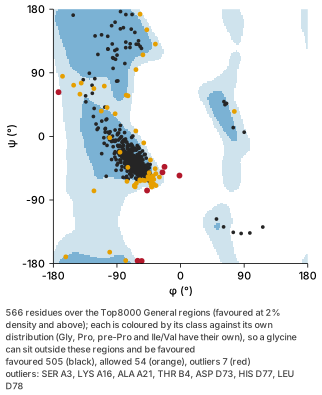
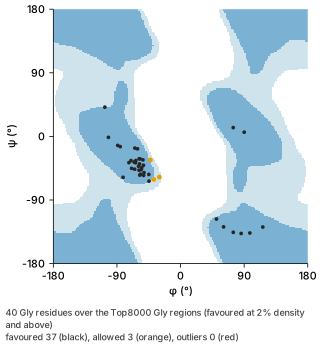
--type glycine). Glycine has no side chain, so its distribution is nearly symmetric through the origin, and the left-handed and extended regions at positive φ that are empty for other residues are favoured for it.By default every residue sits over the General regions and is coloured by its class against its own distribution (Gly, cis- and trans-Pro, pre-Pro and Ile/Val each have one), which is why a residue outside the shaded regions can still be black. --type draws one distribution’s regions and only the residues it scores, which is the plot to look at when a glycine or a proline is in question.
4.3.5 Cubes, web pages and animations (cube, web, animate)
cube evaluates one molecular orbital, or the total electron density, from the basis set and writes it as a Gaussian cube for VMD, Chimera or the viewer. The source needs a basis set and MO coefficients (FCHK, Molden, NWChem with its .movecs).
| Flag | Effect |
|---|---|
--mo <N\|homo-K\|lumo+K> |
Orbital by 0-based index (--mo 48 is vector 49) or by name |
--vector <N> |
Orbital by the file’s own vector number, from 1, as analyze orbitals and plot levels print it |
--density |
The total electron density instead. One of --mo, --vector, --density, --spin-density and --promolecule is required |
--spin-density |
The spin density ρα − ρβ instead: where the unpaired electrons are, positive where alpha is in excess. It integrates to the number of unpaired electrons, which the command reports; a closed-shell run is refused. Checked against Gaussian’s cubegen for the methyl radical |
--promolecule |
The promolecule density instead: free atoms’ densities from Slater’s rules (Slater 1930), summed, in e/bohr³. It needs no wavefunction, so any structure file has one, and it shows the molecule’s size and shape rather than its bonding. Each atom integrates to its atomic number; subshells fill in Madelung order. orbitron cube benzene.xyz --promolecule -o cloud.cube then canonical export cloud.cube --dots 30000 is an electron cloud for a structure with no calculation behind it |
--spin alpha\|beta |
Spin channel of the orbital |
--degenerate |
The orbital’s whole degenerate set as one summed density, Σ|ψ|² over every orbital of its channel within 1e-5 Ha of it |
--spacing <Å> |
Grid spacing, default 0.20. Coarsened, and said so, when the grid would pass eight million points |
--padding <Å> |
Margin around the atoms, default 4.0 |
--movecs <file> |
NWChem .movecs, an OpenMolcas .scf.h5/.rasscf.h5, or a Molpro .xml (with its .xml-sidecar); a sibling of the output is used when present |
--natural |
The natural orbitals in a Molpro run’s .xml instead: a UHF run writes those of its total density beside its alpha and beta sets. One set, in occupation order, so name an orbital with --vector: Molpro’s natural-orbital energies are not orbital energies, and homo/lumo read from them say little. A run whose XML has none, or a source with no Molpro XML, is refused |
-o, --force |
Cube to write; overwrite it |
orbitron cube io/pipelines/tests/fixtures/gaussian/water_cc_pvtz_6d10f.fchk \
  --mo homo -o homo.cube
Wrote homo.cube
orbital 4 (vector 5, HOMO, alpha): 41×49×44 points at 0.200 Å, 4 Å beyond the atoms
∫ψ² over the grid 0.9945 (1 for the whole orbital)The integral is the check on the grid. An orbital integrates to one over all space (the density, to the electron count, which the run prints beside it), so a value well short of that means the box cut off a tail or the spacing missed the cusps.
web writes one self-contained HTML page with the interactive viewer and the structure in it. The page opens offline and can be dropped into slides or a static site; it is the command-line twin of the desktop’s File ▸ Export ▸ Web View. The source is either a bundle (.orbpack), embedded as it is, or any file Orbitron reads, which is exported to a bundle first without MO coefficient matrices, since the page never reads them. Flags: -o <page.html> (the name must end in .html or .htm), --force, --title (default the source’s file name) and --appearance <bundle.json>.
orbitron web io/pipelines/tests/fixtures/gaussian/water_freq_only.log -o water.htmlThe viewer itself is most of the page, about 10 MB. It is embedded in the binary at build time from the viewer assets that extensions/python-bridge/scripts/stage_viewer_assets.sh generates. A checkout built without staging them still builds, and web then refuses with this build has no WASM viewer embedded; run extensions/python-bridge/scripts/stage_viewer_assets.sh and rebuild. To give the page an orbital surface, write the bundle yourself with canonical export --mo (§4.6) and pass the bundle to web.
animate turns a vibrational mode, a trajectory or a camera orbit into a looping GIF, or into numbered PNG frames when the output is a directory (a path with no extension). Exactly one motion is required:
| Flag | Effect |
|---|---|
--mode <N> |
A vibrational mode, numbered from 1 as plot spectrum numbers them, over one full period so the loop closes. --projected takes it from the projected set; --amplitude is the largest excursion as a multiple of the displacement vectors (default 0.25) |
--trajectory |
Play the trajectory, sampled evenly to --frames with the endpoints kept. The global --trajectory-pbc, --trajectory-center and --trajectory-fit options apply |
--orbit vertical\|horizontal\|view |
Turn the camera once about a screen axis: a turntable, a tumble, or a roll in place |
--frames <n> |
Frames in the whole animation, 1 to 2000. Default 24 for a mode or an orbit, every frame of a trajectory |
--fps <n> |
Playback rate, default 20, at most 100. GIF stores delays in hundredths of a second, so a rate that does not divide 100 is rounded |
--width, --height |
Frame size in pixels, default 800×600 |
--appearance <bundle.json> |
Theme, representation and camera from a desktop appearance bundle |
-o, --force |
Output GIF or directory; replace it |
orbitron animate io/pipelines/tests/fixtures/gaussian/water_freq_only.log --mode 1 -o bend.gif
orbitron animate io/pipelines/tests/fixtures/xyz/trajectory_co_rotation.xyz --trajectory --fps 10 -o co.gif
orbitron animate io/pipelines/tests/fixtures/xyz/water.xyz --orbit vertical -o spin/
The frame plan and the encoders are shared with the desktop’s animated export. A frame directory’s run prints the ffmpeg line that encodes it as a video.
4.4 Selection expression cheat sheet
Selection expressions are made of primitive terms combined with boolean operators.
Primitive terms:
all— every atom in the sceneelement O(or a bare symbol likeFe; case is normalised) — select by elementatomic_number == 6— select by atomic numberwithin 5.0 of <selection>— atoms within a radius of any atom matched by a sub-selection (the anchors are included), e.g.within 5.0 of element Owithin_atom(1, 3.0),within_atom_shell(1, 1.5, 3.0)— distance from a single anchor atomwithin_point(0.0, 0.0, 0.0, 5.0),within_point_shell(0, 0, 0, 1, 4)— distance from a pointbonded_to(7)— atoms bonded to an anchorids(1-40,52): an exact atom list, as 1-based ids and inclusive rangesnearest_atoms(1, 5),nearest_point(0, 0, 0, 5)— the k nearestwithin_atom_angle(vertex, ref, min, max)— angular filter around a vertexproperty("partial_charge") > 0.25— registered atom property compared to a threshold; the operator is one of>,>=,<,<=,==,!=chain A,resname HIS,resid 42— residue terms, for structures that carry PDB/mmCIF annotation. Names and chain ids compare case-insensitively.residtakes ranges and lists (resid 1-10,15,20-25; a leading minus is a negative number, as PDB files have them)name CA,name CA+C+N+O— atoms by their PDB or mmCIF atom name (blanks and case ignored;+separates alternatives, as in PyMOL); a file with no atom names matches nothingaltloc B— atoms in retained alternate location B. Blank/shared atoms do not match this term; combine it with another term when both are wantedprotein,nucleic,water,ion,ligand,hetero— what a residue is, without having to know what it is called
In a periodic structure the distance and angle terms measure to each atom’s nearest image, so an atom just across a cell face counts as near.
The class terms are how you say “the ligand” without opening the file first. ligand is the substrate, the cofactor, the inhibitor: not part of a polymer, not water, and more than one heavy atom. ion is the same minus the last condition — a lone Na, Zn or Cl. hetero is all three of water, ion and ligand together, which is the HETATM sense. The five specific classes partition the structure: every atom is in exactly one of protein, nucleic, water, ion and ligand.
They classify by the file’s own evidence where there is any. An mmCIF declares a chemical-component type and a polymer sequence, and a residue the name tables have never seen is still a protein residue when the file says it is one — which is what keeps a modified residue in the chain instead of turning it into a ligand. Where a file declares nothing, a name table is the fallback.
One honest edge: ion means “one heavy atom”, so a residue whose other atoms were never resolved reads as an ion. In 4HHB two phosphates are modelled as the phosphorus alone, and ion selects both.
Atom ids are 1-based.
Naming one residue takes more than one term. A sequence number is only unique within a chain, and a residue name is not unique at all, so chain B and resname HIS and resid 42 is what picks out a single residue. On a scene with no residue annotation — an XYZ file, say — all three match nothing rather than everything.
Boolean operators combine terms: and, or, not, with parentheses for grouping. not binds tightest, then and, then or, so element C or element O and within_atom(1, 3.0) reads as element C or (element O and within_atom(1, 3.0)). The within <R> of operator binds the term that immediately follows it (use parentheses for a compound sub-selection). Examples:
element O and bonded_to(7)within 5.0 of (element O or element N)resname CYS and S— every cysteine sulfur, which is what you want before looking for disulfideswithin 5.0 of (chain A and resid 42)— the environment of one residuewithin_atom(1, 5.0) and not element Hproperty("partial_charge") < -0.3 and not element Oproperty("cp2k:qm_region") > 0.5— the quantum region of a CP2K QM/MM run, so--group 'spacefill:property("cp2k:qm_region") > 0.5'draws it differently from the environment it sits inproperty("cp2k:ring_polymer_radius_angstrom") > 0.05— the nuclei a CP2K path-integral run found delocalised, which in practice is the hydrogens
See the Developer Guide (§5.2 Query & Selection) for the AST and evaluator details, and run orbitron select --help for the DSL overview.
4.5 Inspect stage/task boundaries
Use inspect to review the stages or tasks detected in Gaussian, NWChem, DIRAC, Molpro, and Molcas/OpenMolcas outputs. Molpro logs print task kind, program banner, method/basis hints, correlated energies (when present), and any attached XML sidecar summaries. When Molpro metadata is available you can pass --dirac-task N, --molpro-task N or --molcas-task N (each a 1-based index) or --molpro-kind freq (or --task freq, --task caspt2) to restrict output to a single task or to all tasks of the same kind, and the correlated energy section respects the same filters. Molcas/OpenMolcas outputs are parsed into canonical documents that expose extras.molcas (geometry, module-based task list, optimisation energy profiles, and frequency mode counts), and the desktop Tasks panel renders the same module records.
orbitron inspect io/pipelines/tests/fixtures/gaussian/water_two_stage.logMachine-readable triage (--json). orbitron inspect <file> --json emits the same findings in a shape a script can branch on, carrying the schema / producer / warnings fields described above (orbitron.inspect/2). The subject field says what kind of file was read:
output— anything that parses into a canonical document. Carriesprogram(which program wrote it, named even when no tasks were extracted —formatsays onlyoutfor Molcas, DIRAC and NWChem alike),detected(trajectory,scene, orunparsed),capabilities,frames[](index, step, atoms, bonds, energy, electronic-structure presence),scenefor a single geometry,frequency.modes,program_tasks[]in the same shapeinfo --jsonemits, andmolpro. Machine-facing enum values are snake_case ("qe","single_point"); they were respelled from the Rust spelling when the schemas went to/2.movecs,hessian,molden,civecs,dirac_checkpoint— the companion files, which never become canonical documents and each carry their own fields.trajectory— an XTC read through its--topologypairing:format,frames,atoms, and the first and last frame’sstepandtime_ps.
Electronic structure is reported as presence plus counts, not as the data itself: inspect is triage, and analyze returns the bands, DOS and gaps themselves. One field worth branching on is band_structure.sampling (path or mesh); a mesh run also raises the band_eigenvalues_from_mesh warning, because those eigenvalues are stored in grid order and plotting them as a dispersion is an artefact.
An unparseable file is reported as detected: "unparsed" with a parse_error, and exits 1, in text and JSON alike, so a script can tell it from a file that read. Selector errors are not: --molpro-task 999 fails the same way it does under info, since both use the same selection code.
orbitron inspect run.out --json | jq -r '.detected, (.frames | length)'The human output ends with a “Canonical task overview”: one entry per task or stage with its program, kind, method, basis, energy, and SCF cycle and iteration counts. It prints no byte ranges. Molpro canonical helpers currently operate on entire documents; the CLI’s summary still surfaces correlated energies, population data, and XML attachments so you can script around the structured extras.
4.6 Canonical bundles & cache management
Use the canonical subcommands to decouple heavy program logs from day-to-day analysis. Bundles record every attachment (raw source, MO coefficients, trajectories, volumetric grids) plus SHA-256 hashes so the viewer and CLI can hydrate caches without rereading gigabyte-scale logs.
# Export manifest + attachments for a run
orbitron canonical export io/pipelines/tests/fixtures/gaussian/benzene.log --output benzene.orbpack --pretty

# Several sources are read as one calculation and written as one bundle
orbitron canonical export jobA.out jobB.out --output chain.orbpack

# Emit a verified record for batch automation; failures still exit nonzero
orbitron canonical export run.out --output run.orbpack --json > run.export.json

# Restore the raw source (and hydrate the cache if needed)
orbitron canonical import benzene.orbpack --output benzene.log

# Extract a particular attachment instead of the first raw source
orbitron canonical import benzene.orbpack --id <ATTACHMENT_ID> --output attachment.bin

# Inspect cache location, contents, or purge entries
orbitron canonical cache path
orbitron canonical cache list
orbitron canonical cache purge            # everything
orbitron canonical cache purge <DIGEST>   # one bundle
canonical export flags.
| Flag | Effect |
|---|---|
-o/--output <path> |
Bundle path; defaults to <source>.orbpack |
--pretty |
Pretty-print the manifest JSON |
--force |
Overwrite an existing bundle |
--skip-cache |
Do not hydrate the canonical cache after export |
--json |
Print the versioned orbitron.canonical.export/1 record |
--dry-run |
Report what would be exported and write nothing. CUBE validation reads only metadata; a format with no metadata path may parse fully |
--with-source |
Embed the original source file. Off by default: the copy makes a bundle larger than its own input, and provenance keeps the path and hash regardless |
--scrub |
Strip identifying provenance (absolute paths, hostnames) so the bundle can leave your group. Hashes are kept |
--no-mo-coefficients |
Leave out the molecular-orbital coefficient matrices. Orbital energies, occupations and symmetries stay; surfaces cannot be computed from the bundle. An optimisation stores one matrix per step, so a bundle for a web page, which never reads them, is several times smaller |
--mo <index> |
Export only this volumetric dataset (0-based). A multi-MO cube stores every orbital interleaved, so selecting one is what makes the export small. From a wavefunction source the orbital is evaluated onto a grid. The bundle opens with it drawn as an isosurface at 0.05, unless the flags below record another surface: --mo 48 --volume --isosurface 0.03 draws it as fog |
--movecs <file> |
NWChem .movecs supplying the full MO coefficient matrix, since an NWChem .out prints only a truncated table. Defaults to the sibling <stem>.movecs |
--grid-spacing <Å>, --grid-padding <Å> |
Grid spacing (default 0.20) and molecule padding (default 4.0) when --mo must compute an orbital from a wavefunction |
--no-infer-bonds |
Keep the source’s own connectivity instead of perceiving bonds. Bonds are perceived by default for sources that state no connection table (XYZ and friends) so the bundle renders as the viewer would show it; a source with a complete table is never altered either way |
These flags decide what the bundle wears when it opens, which is otherwise left to whichever viewer reads it:
| Flag | Effect |
|---|---|
--isosurface <VALUE> |
Record an isosurface of the first grid at this value, so the bundle opens drawing it: both contours where the grid is signed (an orbital, a potential), the positive one for a density. With several grid sources, every source’s grids go into one document in the order given. For a density cube in atomic units, 0.001 is the conventional molecular surface |
--colour-by-grid <INDEX> |
Colour that isosurface (or cloud) by another grid of the bundle (0-based, in source order), red where it is negative and blue where it is positive: canonical export density.cube potential.cube --isosurface 0.001 --colour-by-grid 1 is an electrostatic potential mapped on the density. render, web and the desktop draw it |
--colour-range <VALUE> |
Where those colours saturate, in the colouring grid’s own units (atomic units for a Gaussian or ORCA potential cube); without it, the 97th percentile of the surface’s magnitudes |
--dots <COUNT> |
Record the first grid drawn as a cloud of this many points rather than as an isosurface: scattered in proportion to the field’s square for an orbital (the textbook picture of an orbital, its two signs in the two lobe colours) and to its magnitude for a density. The same seed every time, so a figure reproduces. canonical export lumo.cube --dots 20000 |
--wireframe |
Draw the recorded isosurface as its triangle edges, a wireframe, rather than filled. canonical export density.cube potential.cube --isosurface 0.002 --colour-by-grid 1 --wireframe is a potential-coloured mesh with the atoms visible inside |
--volume |
Record the first grid drawn as fog through the whole grid rather than as an isosurface, at full strength where the field reaches --isosurface (0.05 without it) and fading below it: by the field for a density, by its square for an orbital. canonical export homo.cube --volume --isosurface 0.05 |
--appearance <PRESET> |
Record an appearance preset: signature, ink, glow, classic, publication, licorice, spacefill, presentation, print, lineart, sketch, comic or grayscale. Without one a bundle carries no appearance and each viewer falls back to its own default, which is why the same file looked one way on the desktop and another on a web page. licorice and spacefill also record the representation |
--show cartoon\|atoms\|cell |
Record a layer as shown; repeatable. A cartoon is recorded as a flag rather than a mesh, because the ribbon is megabytes for a protein and any viewer that can draw one can rebuild it |
--hide cartoon\|atoms\|cell |
Record a layer as hidden; repeatable. --hide cell is the common one: a PDB’s CRYST1 record makes a protein periodic as far as a renderer is concerned, so a structure nobody thinks of as a crystal otherwise opens inside a box |
--group <how>[;color=<c>][;contacts][;labels]:<selection> |
Record a representation group; repeatable. It travels as its selection expression, so any viewer with the scene re-evaluates it. Same spelling as render --group (§4.3.1) |
--camera <file.json> |
Record a camera, from the JSON render --camera reads (§4.3). Without one every viewer auto-frames the whole structure |
--ribbon-opacity <ALPHA> |
Record the ribbon opacity, 0 to 1 |
The cache lives under the platform-default directory unless ORBITRON_CANONICAL_CACHE is set. Both CLI and GUI share this path, so exporting a bundle immediately benefits viewer loads and vice versa. Helper crates register attachment references through the shared register_attachment_refs / outcome_with_attachments utilities, guaranteeing that CLI exports and viewer loads see identical metadata. When scripting, prefer canonical exports for reproducible automation because they preserve provenance, attachments, and program extras in a single portable file. --json emits the versioned orbitron.canonical.export/1 record with hashes, counts, byte sizes, elapsed time, observed peak RSS, status, and error fields.
4.7 Configuration management (config)
Orbitron persists settings to a platform-specific configuration file:
- macOS:
~/Library/Application Support/dev.Orbitron.Orbitron/config.toml - Linux:
~/.config/orbitron/config.toml(or$XDG_CONFIG_HOME/orbitron/config.toml) - Windows:
%APPDATA%\Orbitron\Orbitron\config\config.toml
orbitron config show prints the stored settings together with the path resolved on the current machine, so there is no need to guess:
orbitron config show
orbitron config show --json
Use config set-thresholds to update values without editing the file by hand:
# Set the loader size limit in bytes
orbitron config set-thresholds --max-file-size 2147483648  # 2 GB

# Or use megabytes for convenience
orbitron config set-thresholds --max-file-size-mb 2048  # 2048 MB = 2 GB

# Unlimited loading (use with caution on large files)
orbitron config set-thresholds --max-file-size 0
Six threshold options are accepted, and several may be set in one call. 0 means unlimited for every one of them:
| Option | Effect |
|---|---|
--max-file-size <bytes> |
Loader size cap |
--max-file-size-mb <mb> |
The same cap in megabytes (conflicts with the bytes form) |
--max-memory <bytes> |
Maximum projected operation memory |
--max-memory-mb <mb> |
The same cap in megabytes (conflicts with the bytes form) |
--max-atoms <count> |
Maximum atoms in one loaded scene |
--max-bonds <count> |
Maximum bonds in one loaded scene |
orbitron config reset-thresholds restores every one of them to its default.
Using a different configuration file
ORBITRON_CONFIG names the file to read and write, in place of the per-platform location above. orbitron config show reports whichever path is in effect, so it is always the answer to “which file is this run using”.
ORBITRON_CONFIG=~/orbitron-batch.toml orbitron info structure.logTwo cases this is for. A shared account that needs several configurations — one per project, or per allocation — can select between them per command. And a batch job that must not depend on whatever an interactive session last saved can point at a file it controls, or at a path that does not exist, which gives the built-in defaults:
ORBITRON_CONFIG=/nonexistent orbitron info structure.logAn empty value is treated as unset, so export ORBITRON_CONFIG= in a profile leaves the normal location in effect rather than resolving to something unexpected. Orbitron’s own test suite uses this variable to keep the CLI tests from reading the settings of whoever is running them.
The saved thresholds apply to all subsequent CLI and GUI operations unless overridden with --max-file-size or --max-memory on a per-command basis. This prevents accidentally loading multi-gigabyte files that could exhaust memory. The viewer’s Preferences dialog (File → Preferences…) sets the loader size cap and saves it to the same config file; the other thresholds are set with config set-thresholds.
4.8 Periodic bundle packaging (pack periodic)
pack periodic assembles a portable directory from a periodic calculation: the canonical document, every figure and CSV the run supports, and optionally the raw files. The exporters read the canonical electronic structure rather than anything program-specific, so a Quantum ESPRESSO output works as well as a VASP one.
The command was called pack vasp when it only handled VASP, and that name still works as an alias.
Basic usage:
orbitron pack periodic vasprun.xml
# Creates: vasprun.orbitron/

orbitron pack periodic pw.bands.silicon.out    # Quantum ESPRESSO
orbitron pack periodic /path/to/vasp_dir --output my_bundle.orbitron
Options: - --force: Overwrite existing bundle directory - --skip-raw: Omit raw input/output files (smaller bundle, canonical only) - --include-volumetric: Include volumetric grids (CHGCAR, LOCPOT, AECCAR, PARCHG)
Bundle contents. Filenames are prefixed with the source stem, and each product is written only when the run carries the data for it:
| File | Contents |
|---|---|
orbitron.json |
Canonical document: structure, band structure, DOS, projections, band gap |
exports/<stem>_bands.csv |
One row per (k-point, band) sample, plus a weight column per shell when a PROCAR supplied projections |
exports/<stem>_bands.png |
Band structure, one curve per band, with high-symmetry corners labelled |
exports/<stem>_fatbands_<shell>.png |
Projected (“fat”) bands: marker area proportional to s/p/d/f character. One figure per shell the run projects onto |
exports/<stem>_dos.csv, _dos.png |
Total density of states |
exports/<stem>_pdos.csv, _pdos.png |
Site- and shell-resolved DOS from a LORBIT >= 10 DOSCAR, grouped per element (Ni d, O p) |
exports/<stem>_band_envelope.csv, _band.png |
Valence/conduction envelope. This is not a dispersion — see the note below |
raw/ |
Copy of the original files (unless --skip-raw) |
volumetric/ |
Grid files (with --include-volumetric) |
manifest.json |
SHA-256 hashes and export metadata |
_band_envelope.csv reduces each k-point to max(E ≤ E_F) and min(E > E_F). That quantity steps to the next band down wherever a band crosses the Fermi level, so it is discontinuous by construction even when every eigenvalue is smooth. For a band-structure figure use _bands.csv / _bands.png.
If the run sampled a Brillouin-zone grid (Monkhorst-Pack, Gamma) rather than a line-mode path, its eigenvalues are stored in grid order — consecutive samples are not neighbours in reciprocal space, and plotting them as a dispersion draws a jagged trace that is an artefact of the ordering. Orbitron detects this and captions the figure SCF MESH, NOT A K-PATH; orbitron inspect warns as well. Re-run with a line-mode KPOINTS for a publishable band figure.
The opposite holds for the band gap: a mesh gives a better gap than a path, because a path visits high-symmetry lines and can miss an extremum lying off them.
Use this command for archival, sharing results without raw files, or preparing datasets for downstream analysis. The GUI’s export dialog includes a Run bundle section with “Save run bundle…”, which uses the same packer.
4.8.5 Superpose two structures (align)
The commonest thing anyone does with two structures: fit one onto the other and ask how far apart they are.
# Fit every atom the two share, and report the RMSD.
orbitron align mutant.pdb wild-type.pdb

# Write the superposed copy out, and get the numbers as JSON.
orbitron align mutant.pdb wild-type.pdb --output fitted.pdb --json
Superposed mutant.pdb onto wild-type.pdb
fitted atoms : 660
RMSD : 0.412 A
rotation : +/- 0.31 deg about its worst axisThe rotation line is the error bar on the transform, taken from the fit’s own residual, and it prints whenever it is finite. It sits beside the RMSD because a thin fit — an extended peptide, a coiled coil — has a good RMSD and a rotation held by almost nothing, and the RMSD alone does not say so.
--atoms chooses what to fit on, and the choice is the analysis:
| Value | Fits on |
|---|---|
matching (default) |
Every atom present in both under the same residue and name |
backbone |
Protein backbone only: N, CA, C, O |
alpha-carbon |
Alpha carbons only |
Fit on matching and a shifted side chain drags the whole superposition toward itself; fit on backbone or alpha-carbon and the fold is what lines up, so the side chain’s displacement is left where you can see it. That is usually the question being asked.
--pairing chooses how an atom in one structure finds its partner in the other, which is a separate question from which atoms are eligible:
| Value | Pairs by |
|---|---|
site (default) |
Residue number and atom name, exactly |
sequence |
Aligning the two sequences, then atom name within corresponding residues |
sequence-local |
The same, but aligning only the best-matching region of each chain |
site is right whenever the two files number the same molecule the same way: a structure against its own refined copy, a mutant built from the wild type, two frames of one system. It is also unambiguous, which is why it is the default — a residue either has a partner or it does not.
sequence is for when the numbering does not agree. A construct with a cleaved tag, a homologue, a structure whose author numbering starts at the expressed rather than the mature protein: site pairing finds nothing to fit on, and renumbering the file by hand is the workaround it replaces.
# The same protein, numbered from residue 201 in one file and 1 in the other.
orbitron align renumbered.pdb original.pdb --atoms backbone --pairing sequence
Superposed renumbered.pdb onto original.pdb
fitted atoms : 304
RMSD : 0.000 A
rotation : +/- 0.00 deg about its worst axis
identity : 100% of aligned residuesChains are paired by identifier, with one exception: when both structures have exactly one polymer chain they are paired whatever each file lettered them, because chain A against chain X is unambiguous and is the commonest comparison there is. With several chains on each side and no identifier in common the command refuses rather than guessing which goes with which.
Every aligned column contributes to the fit, not only the identical ones — a point mutation still has a backbone, and dropping it would put a hole in the fit exactly where the two structures differ most. The atom names carry the rest: a serine aligned to an alanine pairs its N, CA, C, O and CB, and its OG finds nothing to pair with.
The alignment is Needleman–Wunsch (J. Mol. Biol. 48, 443–453, 1970) with Gotoh affine gap penalties (J. Mol. Biol. 162, 705–708, 1982), scored on identity: one long gap costs about what one short gap costs, so a deleted loop opens a single gap rather than being spread across the alignment.
sequence-local is Smith–Waterman (J. Mol. Biol. 147, 195–197, 1981) with the same affine gaps, and it is for structures that share part of a sequence and differ outside it: a domain against a full-length construct, one chain of a complex against a monomer. sequence has to account for every residue, so it pairs the non-shared flanks with each other and each of those becomes an atom pair pulling on the fit. Two ubiquitin chimeras sharing residues 16–59, with their flanks displaced 6 Å, show the size of it:
| Pairing | Fitted atoms | RMSD | Identity |
|---|---|---|---|
sequence |
304 | 2.625 Å | 58% |
sequence-local |
176 | 0.000 Å | 100% |
The 176 is exactly the 44 shared residues at four backbone atoms each.
If one sequence is a substring of the other, both give the same answer, and the difference is only in the score: sequence already places a fragment correctly, because the matched core outscores everything else. It is sharing a region while differing outside it where the two diverge.
sequence-local brings the mirror of the trap it removes: a local alignment can always find some region, so a high identity over eight residues means very little. Read fitted_atoms beside it.
identity is the fraction of aligned residues that hold the same residue, and it is the number that says whether the correspondence means anything. A global alignment gives any two sequences a set of columns, so two unrelated proteins still produce a fit and an RMSD. Orbitron reports the identity and does not judge it, because where the line between homologous and coincidental falls depends on how long the alignment is (Rost, Protein Eng. 12, 85–94, 1999).
--json gives them as fields. Every guard below is printed in the human form too — the JSON is the shape a script branches on, not extra information:
{
  "candidate_atoms": 660,
  "fitted_atoms": 660,
  "moving": "mutant.pdb",
  "output": "fitted.pdb",
  "reference": "wild-type.pdb",
  "rmsd_angstrom": 0.412,
  "rotation_uncertainty_degrees": 0.31,
  "sequence_identity": null,
  "sparsely_paired": false,
  "underdetermined_rotation": false,
  "unpaired_moving": 0,
  "unpaired_reference": 0
}
rotation_uncertainty_degrees is the error bar on the transform, and it is the number a good RMSD can hide. A rotation is pinned by how far the fitted atoms sit from the axis it turns about, so a thin structure — an extended peptide, a coiled coil, a short helix — leaves the rotation about its long axis held by almost nothing. Fitting a 12-residue helix and a 76-residue globular protein against copies of themselves carrying the same coordinate noise, the helix comes out with the better RMSD, 0.352 A against 0.521 A, and a rotation four times less certain: ±1.45° against ±0.25°.
Nothing about it is calibrated. The coordinate error comes from the fit’s own residual, so the number scales with the disagreement the data already showed. It covers the worst single axis, which makes it accurate to about 1.2x where the fit is thin and an underestimate of up to 3x where it is not — the safe direction, and the case where the number is a hundredth of a degree anyway. underdetermined_rotation remains the separate, exact answer: fitted atoms that are collinear leave the rotation free about that line, the uncertainty is infinite rather than large, and --output refuses.
unpaired_moving and unpaired_reference are how you find out that two files you believed were the same protein share far fewer atoms than you assumed — a missing loop, a different protonation, an alternate numbering. A small fitted_atoms beside a flattering RMSD is the shape of a misleading answer. sequence_identity is null under site pairing, which aligns nothing, and output is null without --output.
4.9 Triage metal coordination spheres (analyze metal-sites)
Reports every metal centre in a structure: its coordination number, which reference polyhedron the sphere resembles and how far it sits from it, and each donor’s distance against the tabulated metal–donor value. Two metals whose spheres are one, bonded to each other or joined through a donor and at most two more atoms (a mu-oxo or halide, a pyrazolate, a mu-1,3 carboxylate), are reported as bridged rather than assessed as two spheres. Two metals each held in its own pocket of one ligand are each assessed, however short the ligand between the pockets: the two coppers of a TTHA complex are five bonds apart through its N-C-C-N. Two metals on one protein chain are not bridged either: 1EZM’s zinc and calcium are twenty bonds apart through the backbone, and each is its own site.
orbitron analyze metal-sites complex.xyz --oxidation-state 3
orbitron analyze metal-sites complex.xyz --oxidation-state 3 --json --no-banner
The distance half of the report needs an oxidation state, since the ionic radius is looked up by it. A site uses --oxidation-state when it is given, else the state its file states (a CIF’s Fe3+ type symbol or _atom_type_oxidation_number), else a nonzero formal charge, else the ionic model’s where the file declares its total charge, else the state its own bond-valence sum reproduces within 0.25 over every bond the metal has, else the element’s one usual state (zinc, cadmium, the group 3 and 13 metals), and says which (oxidation_state_source in the JSON). Where the ionic model gives 0, or a state the element is rarely found at, and the sum gives a usual one, the sum’s is used; a state the donor count cannot carry is replaced by the one the element takes at that coordination number.
An archive PDB or mmCIF leaves an ion’s own charge column blank and states the charge once, for the component: FORMUL 2 ZN ZN 2+, or 'Zn 2' in _chem_comp.formula. A single-atom ion takes that charge as its formal charge, so a deposited zinc is Zn(+2) as the file says. A bare XYZ, or a file that states nothing, falls to the bond-valence sum:
  Zn(+2, from bond valence) · atom #378 · CN 4
      Geometry: tetrahedral, 1.18 from ideal (clean)
      Bond valence: 1.76 over 4 bonds, closest to +2 (consistent)
An organometallic gets a state, a configuration and its hapto ligands. Bond valence has nothing to say about a Zr–C bond, so a file that declares its total charge is resolved in the ionic model instead, the way its identifiers are, and the state says where it came from. Each pi-bonded ligand is one site of the sphere, named by its hapticity and whether its carbons close a ring:
  Zr(+4, from the ionic model) · atom #1 · CN 4
      Configuration: d0
      Hapto ligand: η5-Cp
      Hapto ligand: η5-Cp
      Geometry: tetrahedral, 0.18 from ideal (clean)
The ionic model is consulted after a consistent bond-valence sum, because that is measured from the geometry and this is an electron count: against BOS-Lig’s experimental oxidation states it is right for 88.6% of 1,142 complexes (1,012). The configuration is the ionic count, a transition metal’s group less its state, or its f count for a lanthanide or actinide, and is printed only where there is a state.
Electron count. Each centre also gets its valence electron count in the ionic model: the d count plus two electrons for each lone donor (neutral or anionic alike), four for an oxo or a bent imido, six for a linear imido (M-N-C at 160° or more) or a nitride, four for a ketimide R₂C=N⁻ at 160° or more (linear_ketimide, two when bent), none for a neutral three-coordinate borane on the metal, a Z ligand that takes a pair (acceptor), and a hapto ligand’s π electrons, its hapticity less the charge on its bound atoms (η5-Cp⁻ six, η3-allyl⁻ four, η2-alkene two). A hydride is H⁻ here, one more on the metal’s state than the identifiers give it. The count always uses the ionic-model division of the file’s declared charge, so it needs one; where the state above came from bond valence instead, the two can differ, and electron_count.oxidation_state says which the count used.
  Zr(+4, from the ionic model) · atom #1 · CN 4
      Configuration: d0
      Electron count: 16 electrons, under 18: common for early metals and bulky ligands, and a vacant site where a weak donor or an agostic C-H may sit
      Hapto ligand: η5-Cp
      Hapto ligand: η5-Cp
The number is read, not judged: 18, 16 on a d8 centre (the square-planar count), under 18, over 18 (a hapticity or a ligand charge is likely wrong on an organometallic; with no carbon on the metal it is a Werner complex, where octahedral Ni(II) is 20 and the rule does not hold), odd (open-shell, or a ligand charge is wrong, and certainly wrong when the file declares an even-electron multiplicity). A group 11 or 12 d10 ion (Cu(I), Au(I), Zn(II)) has no 18-electron rule and is said so, and an f-block count is given without one. Where the count rests on something the geometry does not settle it is made on one reading with the others given: 16 or 18 electrons, with the reason, and reading: "unsettled" and an unsettled object (the reason and the other totals as alternatives) in the JSON. That covers an atom behind a bound carbon or boron donor that may be bound side-on (not a neutral three-coordinate boron, whose empty p orbital makes it an acceptor that adds nothing, as in a boratabenzene’s ring boron or a borylcarbene’s), a hapto ligand whose bound atoms hold an odd number of π electrons (a slipped ring or allyl, a folded fulvene; a flat Cp drawn as a fulvene is counted as the Cp anion beside a carbocation), a B-H or Si-H that may bind, and a nitrosyl whose M-N-O angle is between 140° and 150° (linear is NO⁺ and bent is NO⁻, and the two differ by two in the metal’s state). Where it rests on one assumption it is made and says so (unsettled with no alternatives): a carbene with no heteroatom taken as neutral or a dianion by its metal, a donor drawn at +1, ligand charges the ionic model could not divide on a zinc or a lanthanide, a state a sum replaced that no reading of the ligands gives, and a d0 metal its π donors offer more than 18 (two linear imidos and four donors, Cp₂Ti with two linear ketimides), counted 18 with the offered total named, since it has no orbital for the π pairs past that. A count is declined with its reason where there is nothing to count on: a metal bonded to another directly or through a ligand, a metal with no coordination sphere, a boron-cage cluster the metal is a vertex of. The JSON carries electron_count with the total, the state and shell used, a reading, and each site’s donation. A separate valence_electrons field, {count, shell}, is the metal’s own d or f count at the site’s state, before any ligand electrons are added.
Trust in the state. Every site with a state says how far to trust it, and why. The grade is how often the reported state was right for metals like this one in 67,315 CSD complexes of the d and f blocks: high at 99% or more, moderate at 95% to 99%, low below 95%. “Like this one” is the element, which source gave the state and whether the ionic model and a bond-valence sum agreed, the number and kind of donors, and whether a non-innocent ligand, identical ligands read differently, or a state outside the element’s usual ones is present. An organometallic is graded the same way from 27,589 CSD organometallics. uncalibrated means no benchmark describes the site: no declared total charge, a unit cell, a metal neighbour (a cluster), or an element with too few benchmark complexes, or too few organometallics for a site with a metal-carbon bond. as_stated is a state you or the file gave, and none a site with no state. Where the ionic model gives a state the element is almost never named at and a bond-valence sum gives a usual one, the sum’s is reported with a bond_valence_fallback caution (--oxidation-state overrides it). The text report prints the grade as a Trust in the state: line under the site’s header, then the share of similar benchmark complexes that were right with its 95% interval and the size of the closest group (99.1% of similar benchmark complexes right (95% interval 88.6 to 99.9%); the closest group holds 25), then each caution. Only groups of at least 10 complexes from 3 CSD entries are reported; where none of the site’s kind is that large the line ends no group of similar complexes is large enough to report and gives the share over the whole benchmark. The table never says exactly how many of a group were right, only a block of counts, two or three up to 400 complexes and wider above (25 of 25 and 24 of 25 both read 24 or 25), and the share is the one expected in the block given the broader group, so no group is printed as all right or all wrong. The interval is where a group near a cut point shows: the grade is the share’s, and a share of 95.3% with an interval of 93.7 to 96.5% (866 four-coordinate N,O-donor Ni(II) complexes) is moderate by a hair. In the JSON the grade is trust.confidence. trust.features is what the grade was looked up by (the two methods’ states, the bonds, the donor kinds and the three flags), trust.calibration says which part of the benchmark answered, how many complexes it holds, the share right (accuracy), its 95% interval and the sentence the text prints (measured), or why there is none, and trust.cautions lists the cautions, each with a kind, a sentence and ligands, the ligands it names as {"atoms": [...]} (an identical_ligands_differ entry also has the ligand’s charge; a caution about the whole site has none). The convention the states are in (each ligand at its closed-shell charge, the metal takes the rest, hydride as H⁻) is in trust.convention and printed once above the sites. A site with one donor has an empty shapes list, and a hapto ligand is a hapto entry with a distance_angstrom to the metal rather than a row of donors. See Metal sites: accuracy and limits.
Ligand field. A d1 to d9 centre with four to seven σ donors also gets the d-orbital pattern a σ-only angular overlap model gives its geometry, in units of e_σ, with the high-spin and low-spin fillings, unpaired electrons, a model LFSE and a Jahn-Teller flag. It is a model of the pattern, not a prediction: π effects are left out, e_σ is not estimated and neither spin state is chosen, and the text report closes the block with a line saying so. --json carries ligand_field with levels and fillings, or {"declined": reason} for an f-block metal, a hapto ligand, an oxo or imido, a periodic structure or a sphere outside four to seven donors.
  Ligand field (sigma-only model, units of e_sigma): t2g x3 at 0.00, eg x2 at 3.00
      d6 high spin: 4/2 electrons per level, 4 unpaired, LFSE -1.20, weakly Jahn-Teller active
      d6 low spin: 6/0 electrons per level, 0 unpaired, LFSE -7.20
Dioxolene ligands. A chelating catecholate or N-aryl 2-amidophenoxide on a d-block metal is read at its redox level from its own bond lengths, after Brown (Inorg. Chem. 2012, 51, 1251), and the metal takes the charge that leaves. Each is listed with its metrical oxidation state (0 an (imino)quinone, -1 a radical (imino)semiquinonate, -2 the dianion):
  Cu(+2, from the ionic model) · atom #1 · CN 4
      Electron count: 17 electrons on the metal and its closed-shell donors, odd: with 1 ligand radical the complex is even-electron, an open-shell metal coupled to them
      Catecholate ligand (#6, #7): metrical oxidation state -1.15, semiquinonate, radical monoanion
--json carries redox_ligands per site (atoms, family, metrical_oxidation_state, reading) and the count’s reading is ligand_radical there. See Metal sites: accuracy and limits for the domain and the numbers.
Agostic and anagostic C-H contacts. A hydrogen bonded to a carbon and close to the metal is listed under Brookhart, Green and Parkin’s windows (PNAS 104, 6908, Fig. 6): agostic at M···H 1.8-2.3 Å with M-H-C 90-140°, anagostic at 2.3-2.9 Å with 110-170°. The windows are fixed in Ångström, as in the paper. Geometry does not finish the classification, and the paper’s own Table 1 shows it: it calls a Pt(dppp) contact at M···H 2.25 Å anagostic because Pt(II) is a d8 square planar centre with no vacant orbital to take the C-H bond. So an agostic-window contact on a d8 centre whose sphere is a square plane is reported as anagostic, and basis says which rule decided; without an oxidation state the window’s name stands, with that said. A T-shaped d8 centre keeps its agostic contact, its vacant site being where the C-H sits. The paper’s other condition, that an agostic metal has at most 16 electrons, is applied from the electron count where the count is settled and the ligands closed-shell: an agostic-window contact on a metal already past 16 is reported anagostic with basis “more than 16 electrons, no vacant orbital”. The count is the ligands’, and never includes the contact itself, since bond perception does not bond an agostic hydrogen to the metal. Over the 4,466 tmQM complexes of the benchmark, 44 contacts fall in the agostic window: 38 are agostic, 3 anagostic by the d8 rule and 3, all on silver, by the count.
  Pt(+2, from the ionic model) · atom #1 · CN 4
      Configuration: d8
      Anagostic C-H: H #76 on C #36, M···H 2.25 A, M-H-C 132° (d8 square planar)
      Geometry: square planar, 0.80 from ideal (clean)
A C-H shorter than 1.05 Å (an X-ray hydrogen, about 0.1 Å short) is moved along its bond to 1.09 Å before the distance is read, as the CSD does; a DFT geometry is left alone. The carbon has to be connected to the metal through bonds, since the paper’s agostic bond is intramolecular: a C-H of a neighbouring molecule, a solvent or a counter-ion is not one. In a crystal the vectors are minimum-image ones and the connectivity includes the bonds across a cell face, so a complex split by a face is measured whole. A hydride and a dihydrogen ligand have no carbon and are not contacts, and nothing closer than 1.8 Å is reported. --json carries agostic_contacts per site.
The shape measures are SHAPE’s. Each site lists every reference polyhedron for its coordination number under the code SHAPE prints for it, with the continuous shape measure SHAPE reports when told which atom is the metal — the ML_n measure, with the metal as a vertex, which is what a paper’s table quotes:
  Rh(state unknown) · atom #24 · CN 6
      Geometry: octahedral, 1.65 from ideal (clean)
      SHAPE (ML_n): OC-6 1.684, TPR-6 14.954
The Geometry line is the donors alone at four donors and more, which the verdict is calibrated on, and the metal a vertex at two and three; --json carries both for every shape (shapes[].measure and shapes[].measure_with_centre). The reference polyhedra are SHAPE’s own, and the measures agree with SHAPE’s program to 0.001 on 88 real spheres from two to twelve donors, checked in the test suite. Where a large sphere forces both programs to search rather than try every assignment, Orbitron’s search is the more thorough: it never reads higher than SHAPE, and on two spheres of 88 it finds a slightly lower measure. The five-coordinate square pyramid is SHAPE’s vOC-5, an octahedron less one vertex, not its spherical SPY-5.
A sum over only some of the bonds is not used, because the missing bonds are missing from the sum, and nor is one that misses its own state by more than 0.25. Such a site prints Co(state unknown), and its distances are reported without a comparison.
Some parameters name no oxidation state. Brese and O’Keeffe extrapolated most bonds to N, S, P and the heavier halides without one, and the compilation files them under a placeholder valence of 9. Those rows stand in for any state that has none of its own, and the report counts them:
  Co(state unknown) · atom #1 · CN 6
      Bond valence: 2.88 over 6 bonds, closest to +2 (poor fit — do not rely on this)
        2 of them with parameters that state no oxidation state (Brese & O'Keeffe, extrapolated)
For a transition metal’s nitrogen donors they were fitted to nitrides rather than complexes and run long, so a sum leaning on them tends to read high: this cobalt is Co(II). Where Liu and Thorp fitted the pair to coordination complexes instead (Inorg. Chem. 1993, 32, 4102: V, Mn, Fe, Ni, Cu and Mo with O, N and S), their value is used before the generic one, though never over Brown and Altermatt’s, which the authors themselves prefer for solids.
Copper has its own table, from Shields, Raithby, Allen and Motherwell (Acta Cryst. 2000, B56, 455), fitted to copper complexes in the CSD, and it replaces every other source for copper. Two things the pair alone does not say choose the row. A nitrogen donor is taken by how many atoms it is bonded to within its ligand (a nitrile, a pyridine or imine, an amine), which moves Cu(I)’s R₀ by 0.15 Å; that count needs the hydrogens, so a structure without any uses the ligand-independent row. And two- and three-coordinate Cu(I) take the rows fitted at that coordination. The paper’s Cu(III) rows are left out: they cover only C, N and S, and as a candidate Cu(III) would stop any copper with an O, P or halide donor from being assigned a state.
A state is only adopted if every state could be compared. A cobalt oxide sums to about 2 with Co(II) parameters, but Co(III) has none for Co–O, so +2 wins without having been tested against +3:
  Co(state unknown) · atom #1 · CN 6
      Bond valence: 2.00 over 6 bonds, closest to +2 (consistent, but another state has no parameters for some of these bonds and could not be compared)
Such a site is not given a state from bond valence. Against BOS-Lig’s experimental states for 1,142 tmQM complexes (GFN2-xTB geometries), 161 sites are adopted and 135 of those are right; without the rule 208 would be, and 43 wrong. Copper prompted the rule: before its own table, every Cu(I) complex could be summed only as Cu(II). Reproduce with scripts/metal_complex_benchmark.py bvs.
Bond valence measures it from the geometry, so every site also reports the oxidation state its own bond lengths are most consistent with:
  Fe(state unknown) · atom #1 · CN 3
      Donors found: 3, fewer than this ion's usual 6 — distances compared at 6
      Bond valence: 1.57 over 3 bonds, closest to +2 (approximate)
The sum is Σ exp((R0 − R) / B) over the site’s bonds, with R0 and B from Brown and Altermatt (Acta Cryst. 1985, B41, 244-247) where they fitted a value and Brese and O’Keeffe (Acta Cryst. 1991, B47, 192-197) otherwise. R0 depends on the assumed oxidation state, so the reported state is the tabulated one that reproduces itself most closely rather than a value read off a table.
Read the grade, not just the state. consistent is a sum within 0.25 of the state it names; approximate within 0.6; and poor fit — do not rely on this beyond that, which means the geometry, the coordination sphere or the parameters do not describe the site. The example above is approximate because the sphere is genuinely incomplete — three chlorides where iron usually has six — and an incomplete sphere sums low. That agrees with the donor-count warning printed directly above it, and the two disagreeing would be the thing to look into.
Sites with no tabulated parameters report no bond valence rather than a sum of zero, since an oxidation state of zero is a different claim from having nothing to say. Cross-face contacts count, so a periodic structure’s boundary atoms are summed over their real coordination rather than the part that fits in one cell.
A site is flagged for review when it matches no reference shape, or when a donor sits more than 0.5 Å from its tabulated distance. Reading the verdicts:
| Verdict | Means |
|---|---|
clean |
The sphere resembles a reference polyhedron closely. |
drifted |
A recognisable shape, distorted. |
no_clear_match |
Reference shapes exist for this donor count and none fits. |
unrecognised |
No reference shape exists for this donor count. |
too_few_donors |
One donor, where a shape measure means nothing. |
no_donors |
Nothing lies within bonding range of the metal. |
bridged |
Bonded, but sharing a bridging ligand with another metal; not assessed as a sphere of its own. |
Three donors are told apart by where the metal sits among them, since three points alone always lie in a plane: trigonal planar, trigonal pyramidal (a tetrahedron with a corner empty) or T-shaped (an octahedron with three corners empty). A zinc whose water was not modelled reads trigonal pyramidal, which is the report saying a ligand is missing.
Two donors are measured with the metal, as SHAPE measures ML2, since two points alone always measure zero: linear (L-2), V-shaped (vT-2, 109.5°) or L-shaped (vOC-2, 90°). A two-coordinate copper, silver, gold or mercury is judged against the line alone, so a gold(I) bent to 100° is a distorted line rather than a clean V. A sandwich complex is two sites, and ferrocene reads linear.
A centre with a stereochemically active lone pair is judged against the shapes a CSD census of these ions finds them in: arsenic, antimony and bismuth(III), selenium and tellurium(IV), and germanium, tin and lead(II), unless a donor is a boron, which takes the pair. At three donors that is the trigonal pyramid or its right-angled form (fvOC-3), at four the seesaw (SS-4) or the square, and at five the square pyramid with the metal in its base (vOC-5). Every three-coordinate centre lists fvOC-3 in its SHAPE row and every four-coordinate one SS-4; they judge no other centre and never end a shape path.
clean is a statement about shape, not correctness — see Viewer §Geometry accuracy. Two verdicts are easy to over-read:
too_few_donors can never be flagged, whatever is wrong with it. A one-donor centre gets no shape measure, and often has no distance to compare either. Over a 24,000-structure corpus, before two-donor centres were measured (2026-10), one- and two-donor sites were 4,947, and the ones whose ligands had simply never reached the metal — donors sitting three to five Å away — were among them, reported without a flag because the report had nothing to measure.
no_donors means perception found no bond, not that the metal is bare. A metal at an unusual distance, or one whose donors the connectivity missed, reads the same as an isolated ion.
Neither is a defect in the report; both are the honest answer to a question that has no evidence behind it. Treat an unflagged site as unexamined rather than approved.
4.10 Filesystem inspection (fs)
The fs commands inspect the local data root.
List directory contents:
# List current directory (or --data-root if set)
orbitron fs list

# List specific directory
orbitron fs list /data/projects/benzene

# JSON output for scripting
orbitron fs list calculations --json
JSON output carries the schema / producer / warnings fields described above, merged in beside the listing:
{
  "entries": [
    {"name": "opt.log", "is_dir": false, "size": 1048576, "extension": "log"},
    {"name": "freq", "is_dir": true, "size": 0, "extension": null}
  ],
  "path": "calculations",
  "producer": {"name": "orbitron", "version": "0.8.0", "commit": "<release-commit>"},
  "schema": "orbitron.fs.list/1",
  "warnings": []
}
Check file existence:
# Prints "<path> => exists" or "<path> => missing", and exits 0 or 1 so it can
# be used in a shell conditional:
#   if orbitron fs exists calculations/benzene.xyz; then ...
orbitron fs exists calculations/benzene.xyz
4.11 A job list in TOML (batch)
batch runs a list of ordinary CLI actions from one file, so a directory of runs gets the same treatment without a shell loop that has to re-derive every output path.
orbitron batch jobs.toml
orbitron batch jobs.toml --jobs 4 --keep-going
orbitron batch jobs.toml --only-job 3
The file has an optional [defaults] table and an array of [[jobs]]. Each job names its action — info, analyze, convert or render — and the keys that action takes:
[defaults]
cell_cubic = 12.0
pbc = "abc"

[[jobs]]
action = "info"
source = "runs/benzene.log"
json = true

[[jobs]]
action = "analyze"
module = "populations"
source = "runs/benzene.log"
top = 12

[[jobs]]
action = "convert"
source = "runs/benzene.log"
output = "structures/benzene.xyz"
frame = 2
force = true

[[jobs]]
action = "render"
source = "structures/benzene.xyz"
output = "figures/benzene.png"
width = 1600
height = 1200
camera = "cameras/front.json"
force = true
module on an analyze job is one of geometry, orbitals, populations, bond-orders or vibrations — the five that take no analysis-specific input beyond the source. The rest of the analyze family is not reachable from a batch and is run as its own command.
The examples show only some of the keys. Every job also takes no_banner, plus frame on info; analyze takes json, frontier, limit, all and projected as well as top; convert takes format and trajectory; and render takes frame, diagram, diagram_style, diagram_show_h, diagram_no_polish, diagram_label_scale and diagram_interpretation. Each key matches the CLI flag of the same name.
An unrecognised key is an error, not a shrug. Every table rejects fields it does not know, so widht = 111 fails the whole file rather than rendering at the default width and leaving you to notice later. The same holds for action itself.
force is required on convert and render jobs whose output already exists. Batch jobs name their outputs explicitly, and a typo in one should not destroy a figure that took an hour to set up.
--jobs N runs N jobs at once, each in its own process, with output still emitted in job order; render jobs stay serialised among themselves because they contend for the GPU. --only-job N runs the Nth entry alone, which is how --jobs works internally and also how you re-run one failure out of a long list. Without --keep-going the run stops at the first failure; with it every job runs and the command still exits non-zero if any failed.
4.12 Cluster to laptop, end to end
This is the workflow the bundle format exists for. The calculation output stays on the machine that produced it, and what comes down is a few hundred kilobytes that opens instantly and carries its own provenance.
On the cluster, after the job finishes:
# What will this cost to open? Check before committing a login node to it.
orbitron resources cu-freq.out

# One bundle beside the run. Source-light by default: the 22 MB log is
# referenced by path and hash, not copied in.
orbitron canonical export cu-freq.out -o "$SCRATCH/prepared/cu-freq.orbpack" --json \
  > "$SCRATCH/prepared/cu-freq.export.json"
The --json record is what makes this scriptable: it carries the hashes, counts, byte sizes, elapsed time, observed peak RSS and status, and the command exits non-zero on failure, so a loop over a hundred runs can be verified rather than eyeballed.
Copy the bundle down. It is one file:
rsync -av login:'$SCRATCH/prepared/*.orbpack' ~/runs/On the laptop, the bundle behaves like the original source everywhere:
orbitron inspect ~/runs/cu-freq.orbpack
orbitron analyze vibrations ~/runs/cu-freq.orbpack --top 10
orbitron view ~/runs/cu-freq.orbpack --tui
Nothing re-parses the log at any point after the export. The bundle is the parsed document, and opening one hydrates the local canonical cache, which the CLI and the desktop share — so analyze at the terminal and the same file opened in the viewer are served from the same place.
Two flags worth knowing before the first run. --with-source embeds the original log, which makes the bundle larger than the run it describes and is what you want when the bundle is the archive rather than a working copy; without it the 22 MB log stays on the cluster, referenced by path and hash. --scrub strips absolute paths and hostnames while keeping the hashes, which is what makes a bundle safe to send outside your group.
For the scripted version over a whole directory — a serial loop, a Slurm array, per-source JSON records, and a verified transfer list — see examples/hpc-bundle-preparation/.