Multi-panel figures
Each orbitron plot command, and orbitron orbital, draws one panel. Putting several on a page is left to the tools a paper is already made with: LaTeX, Inkscape or Illustrator. Those give you the freedom a figure usually needs, such as insets, uneven grids and annotations. What Orbitron does is make the panels line up. Panels drawn at the same size, with the same margins, have their plot boxes in exactly the same place, so they abut cleanly with no nudging by eye.
The four things that line panels up
Size. Give every panel a physical size with --width and --height (3.35in, 8.5cm, 115pt). Stacked panels share a width; panels side by side share a height.
Margins. --margins LEFT,RIGHT,TOP,BOTTOM fixes the distance from each edge of the figure to the plot box. Every run prints the margins it used:
margins 36.4pt,4.0pt,19.7pt,7.0pt (--margins to line another panel up)Two panels with different tick labels need different amounts of room: a y axis running to 100 is narrower than one running to 60.0. Drawn with automatic margins, their plot boxes start in different places. Draw each panel once, take the largest value on each side the panels share, and draw them again with those. A side left as auto still fits its own content.
Shared axes. --no-x-labels drops an axis’s title and tick labels but keeps the axis and its ticks, for a panel stacked above another on the same x axis; --no-y-labels does the same for a panel beside another on the same y axis. Give shared axes the same range with --xlim or --ylim.
Labels and legends. --panel-label "(a)" puts the label in the top-left corner, in the same place on every panel whatever its tick labels. --no-legend draws no legend and keeps no room for it, for all but one panel, or for all of them when the caption explains the colours. The figure’s notes and metadata still record what the legend would have said.
Example: two spectra on one x axis
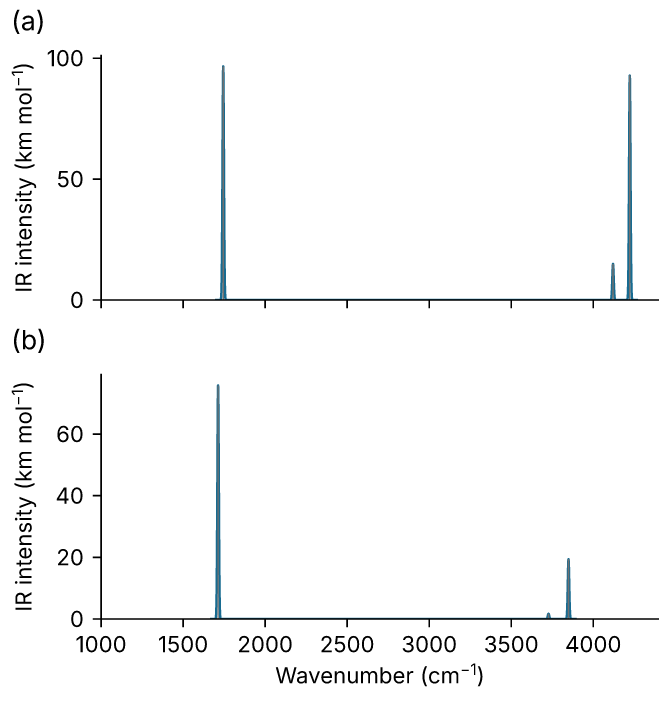
Water’s IR spectrum from an NWChem run and from a Gaussian run, stacked on a shared wavenumber axis.
First draw each panel with automatic margins and read what each needs:
orbitron plot spectrum h2o-freq.out --min-frequency 100 --xlim 1000 4400 \
    --width 3.35in --height 115pt --no-x-labels --panel-label "(a)" -o a.svg
#   margins 36.4pt,4.0pt,19.7pt,7.0pt
orbitron plot spectrum water.log --min-frequency 100 --xlim 1000 4400 \
    --width 3.35in --height 139pt --panel-label "(b)" -o b.svg
#   margins 33.3pt,4.0pt,19.7pt,31.0pt
The left margins differ (36.4 pt against 33.3 pt), so the axes would not line up. Draw both again with the larger left margin and the shared right and top ones. The bottom margin stays auto: only panel (b) carries the x tick labels.
M=36.4pt,4pt,19.7pt,auto
orbitron plot spectrum h2o-freq.out --min-frequency 100 --xlim 1000 4400 \
    --width 3.35in --height 115pt --margins $M --no-x-labels \
    --panel-label "(a)" -o a.svg
orbitron plot spectrum water.log --min-frequency 100 --xlim 1000 4400 \
    --width 3.35in --height 139pt --margins $M --panel-label "(b)" -o b.svg
The two heights are chosen so the plot boxes are the same height: panel (b) is 24 pt taller because its bottom margin is (31 pt against 7 pt).
Example: an orbital beside its level diagram
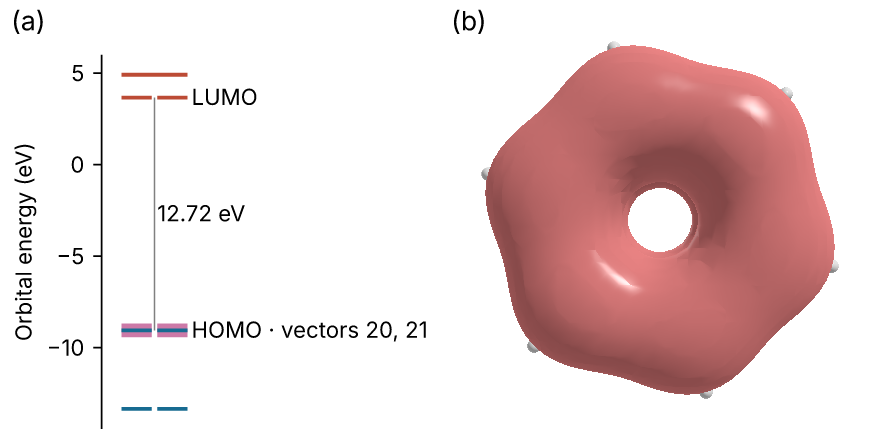
A level diagram with the rendered orbital highlighted, beside the orbital itself. Here the two panels share a height and a panel-label position; the render has no axes to align.
orbitron plot levels benzene.scf.molden --highlight 20,21 --count 3 \
    --no-legend --width 2.2in --height 2.2in --panel-label "(a)" -o levels.svg
orbitron orbital benzene.scf.molden --mo homo --degenerate --iso 0.05 \
    --width 2.2in --height 2.2in --dpi 300 --background white \
    --panel-label "(b)" -o orbital.png
--highlight 20,21 marks the e1g pair that panel (b) draws. --degenerate draws the pair as its summed density, which, unlike either member alone, does not depend on how the program happened to rotate the pair.
Putting the panels together
Every figure records its size, so the panels only need placing.
LaTeX. Convert the SVGs to PDF first. Draw them with --outline-text if the converter will not have the Inter font, since that writes the text as outlines. Then place the panels at their natural size:
\begin{figure}
  \centering
  \includegraphics{a.pdf}\\[-1pt]
  \includegraphics{b.pdf}
  \caption{IR spectra of water from (a) NWChem and (b) Gaussian.}
\end{figure}
Scaling a panel (width=\linewidth) scales its text too, so draw it at the size it will be printed instead: --width 3.35in for a single journal column, --width 7in for a double one.
Inkscape or Illustrator. Import each SVG and snap them edge to edge. Their page boundaries are the figure boundaries, so edges that touch put the plot boxes in line.
When a panel is refused
A panel that cannot be drawn cleanly at the size asked for is refused, and the message says what would fit, rather than drawn with overlapping text:
- the y axis title is 83 pt long and the plot 65 pt tall; make the figure at least 134 pt (1.86 in) tall: a short panel with a long y title. The title is drawn along the axis, and would otherwise run into the panel label or off the figure. With an automatic height the figure is simply made tall enough.
- the level labels need more room than a 128 pt plot has; widen the figure: long labels, from
--characteror--symmetry, on a narrow diagram. - the left margin is 33.3 pt, but its tick labels and titles need 36.3 pt; widen it or leave it auto: a
--marginsvalue copied from a panel with shorter tick labels. Take the larger of the two.
An automatic y range fits what --xlim shows, in spectrum, dos, pdos, opt and md. The near-zero rigid-body modes of a raw frequency run, or the first steps of an optimisation, do not set the scale of a window that leaves them out. A DOS drawn with --energy-vertical takes its energy window from --ylim instead. Panels meant to be compared by height still need one --ylim, since each otherwise fits its own data. Panels can share one --pin list too: a pinned mode outside a panel’s --xlim is not labelled there, and the run’s notes say which.